
Imagine you’re in the middle of an intense gaming session or tackling a crucial work project, and suddenly, the power goes out. Frustrating, right?
But what if there was a way to keep your desktop computer running smoothly even during a power outage? Portable power stations might just be the solution you need. These compact devices promise to deliver a backup power source, but can they truly handle the demands of a desktop computer?
You’ll uncover the truth about whether portable power stations are up to the task. Discover how they work, what to look for, and whether investing in one is worth it for your desktop setup. Keep reading to ensure you’re never left in the dark again.
Portable Power Station Basics
Portable power stations are like big batteries. They store energy for later use. These devices help power gadgets when there’s no wall plug. You can charge them at home or with solar panels. They’re useful for camping and emergencies.
Portable power stations come in different types. Some are small and light. Others are bigger and hold more power. Key features include:
- Battery Capacity: How much energy it stores.
- Output Ports: For plugging in devices.
- Charging Methods: Wall plug, car, or solar.
- Weight and Size: Easy to carry or not.
Choose one based on your needs. For desktops, you need a powerful one.
Understanding Desktop Computer Power Needs
Desktop computers need more power than laptops. A typical desktop uses between 200 to 500 watts. The power supply inside the computer converts electricity for use. Monitors and other devices also need power. They add to the total power used. Knowing the right power helps in choosing a power source.
Several factors change how much power a desktop uses:
- Processor:Faster processors use more power.
- Graphics Card:High-end cards need extra watts.
- Storage:Solid-state drives (SSD) use less power.
- Peripherals:Devices like printers increase power needs.
Understanding these factors helps manage electricity use better.
Compatibility Factors
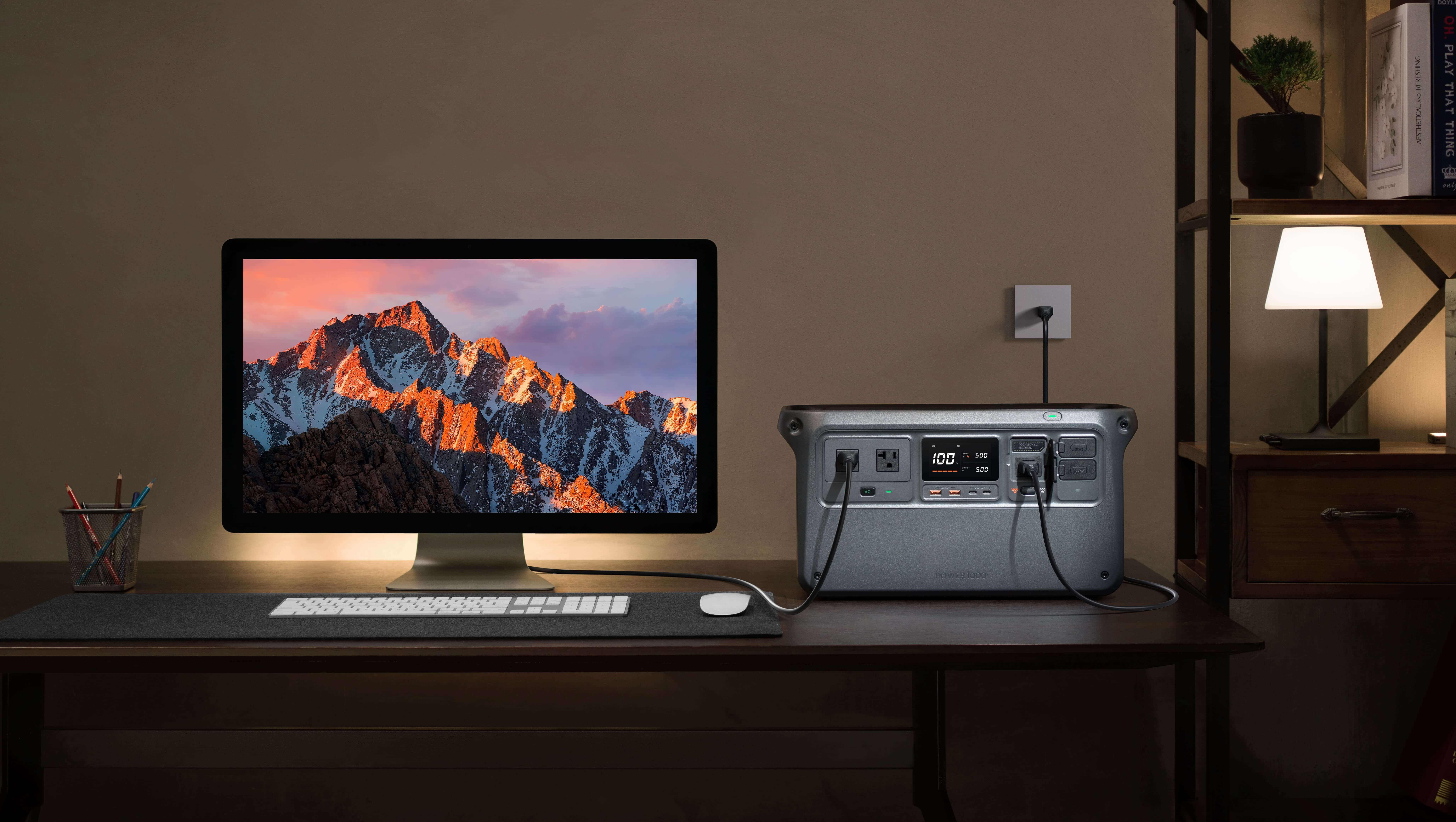
Portable power stations can run desktop computers if they have adequate wattage and compatible voltage output. Check your computer’s power requirements and the station’s specifications to ensure compatibility. Always consider the duration of power supply needed for uninterrupted computer use.
Wattage And Voltage Requirements
Desktop computers need certain power levels. Wattage is important. Most desktops need between 200 and 600 watts. Check your computer’s power supply. It tells you the wattage needed. Voltage matters too. Most desktops use 110 to 240 volts. Portable power stations must match these numbers. A mismatch can damage your computer. Always check your power station’s specs.
Battery Capacity Considerations
Battery capacity tells how long a power station can run a device. Look for watt-hours (Wh) on the power station. A higher number is better. If your desktop uses 300 watts, a 600Wh battery lasts about two hours. That’s important for long use. Ensure your power station has enough capacity. It must match your desktop’s needs.
Credit: www.dji.com
Performance Metrics
Portable power stations can run desktop computers effectively. They deliver consistent energy, supporting devices with varied power needs. Performance metrics like wattage and battery capacity determine efficiency in operation.
Efficiency Of Power Supply
A portable power station can run a desktop computer. The efficiency depends on the power station’s capacity. Many power stations are designed for high efficiency. They convert energy with minimal loss. This helps the computer run smoothly. Energy conversion is key for performance. Choose a power station with high wattage. It should match the computer’s needs. This ensures it runs without any issues. A low-efficiency power station may struggle.
Duration Of Operation
Most power stations can last several hours. Battery capacity affects duration. Larger batteries offer longer run times. A desktop uses more power than smaller devices. Ensure your power station is fully charged. This maximizes operation time. Power stations with higher capacity last longer. Calculate the computer’s power needs. Compare them to the power station’s capacity. This helps determine how long it will run. Always monitor the battery level.
Real-world Testing Scenarios
Exploring portable power stations’ ability to run desktop computers reveals practical insights. These devices can power desktops temporarily. Efficient for short tasks or power outages, but check power requirements first.
Case Studies
Many people wonder if portable power stations can run desktop computers. Some users tested with different power stations. They found most power stationsworked well. But not all power stations are the same. Bigger power stations give more power. Smaller ones might not work for long hours.
Power stations with a higher watt capacityare better. They can handle more power needs. Users recommend checking the power needs of your computer. This helps to choose the right power station.
User Experiences
Users shared their experiences with portable power stations. Some said their computers worked fine. Others had issues with low battery life. It’s important to check the power station’s battery life. A power station with a long battery life is better.
- Check the power station’s watt capacity.
- Ensure your computer’s power needs match.
- Look for a station with long battery life.
Power stations are useful for outdoor or emergency use. Choose the right one for your computer.

Credit: vtoman.com
Pros And Cons
Portable power stations can run desktop computers, offering flexibility and mobility. Yet, they may not support high-performance tasks due to limited power capacity. Consider power needs before relying on them for consistent use.
Benefits
Portable power stationscan help when electricity goes out. They are easy to move and use. You can take them anywhere you want. These power stations are quietand do not make noise. They are also good for the environment. They do not make dirty air. They can charge different devices like phones and tablets. They are very usefulfor camping trips. You can use them to power lights and small gadgets.
Limitations
- Not suitable for big computers.
- Limited power supply.
- May run out of charge fast.
- Can be expensive to buy.
- Heavy to carry sometimes.
Choosing The Right Portable Power Station
Portable power stations can run desktop computers if they offer the right wattage. Check the power station’s output. Ensure it meets your computer’s power needs for seamless operation.
Key Features To Look For
Battery capacityis crucial for desktop computers. Look for high watt-hours. A good station should have multiple outletslike USB and AC. Check for fast charging optionsto save time. Portability matters; choose lightweight and compact models. Safety features like overload protectionare essential. Ensure compatibility with computer specifications. Consider noise levels; quieter models are better. Look for a durable designto last longer.
Popular Models
| Model | Capacity | Features |
|---|---|---|
| EcoFlow Delta | 1260Wh | Fast charging, multiple outlets |
| Jackery Explorer 1000 | 1002Wh | Lightweight, solar compatible |
| Goal Zero Yeti 500X | 505Wh | Durable, safety features |
Future Of Portable Power
Portable power stations can efficiently run desktop computers, offering a reliable solution for power on the go. These devices ensure uninterrupted computing, making them ideal for remote work and outdoor activities. As technology advances, portable power options continue to grow, meeting diverse energy needs.
Technological Advancements
Portable power stations are improving quickly. They can now support more devices. Desktop computers need a lot of power to run. New power stations are designed to handle this. They have stronger batteries and better efficiency. These advancements make portable power more reliable. Technology is making them smaller and lighter. This helps with easy transport.
Potential Improvements
Power stations could get even better soon. Manufacturers are working on longer-lasting batteries. They are also focusing on faster charging times. New materials might increase their durability. This will help them last longer. Future models could have smart features. They might adjust power based on device needs. These improvements will make them more useful.

Credit: udpwr.com
Frequently Asked Questions
Can A Power Station Run A Desktop Computer?
Yes, a power station can run a desktop computer. Ensure it provides sufficient wattage and compatibility for your system’s requirements. Check your computer’s power consumption to match the power station’s output. Verify the voltage and connector types to avoid any compatibility issues.
What Are The Disadvantages Of A Portable Power Station?
Portable power stations can be expensive and offer limited power capacity. They may have slow recharging times and can be heavy to transport. Some models might not support all device types. High power appliances can quickly drain the battery. Regular maintenance might be needed to ensure optimal performance.
What Gives Electric Power To Run A Desktop Computer?
A desktop computer runs on electric power supplied by its power supply unit (PSU). The PSU converts alternating current (AC) from wall outlets into direct current (DC) used by computer components. It ensures stable power delivery to the motherboard, CPU, and other hardware, enabling smooth operation.
What Will A Portable Power Station Run?
A portable power station can run small appliances like laptops, smartphones, mini-fridges, lights, and fans. It also charges devices via USB or AC outlets, providing reliable power during camping trips or emergencies. Check its wattage capacity to ensure compatibility with your devices.
Conclusion
Portable power stations can run desktop computers with proper planning. Choose the right model. Consider power capacity and output. Check your computer’s power needs. Match them with the station’s capabilities. This ensures smooth operation. Portable power stations offer flexibility and mobility.
Ideal for remote work or emergencies. They provide a reliable backup solution. Always test compatibility before relying on them. Make sure connections are secure and stable. Proper usage can prolong device life. Portable power stations prove useful. They meet various energy needs.
A smart choice for tech-savvy users.