
Imagine being on a weekend camping trip or working remotely in a cozy café. You’ve got your laptop, phone, and maybe even a tablet—all demanding power.
A portable power station can be your lifesaver, but what happens when you need to charge multiple devices at once? That’s where USB hubs come in. You might be wondering: Do portable power stations work with USB hubs? The answer could change the way you stay connected while on the go.
You’ll discover how these two gadgets can team up to keep you powered up and ready for anything. Get ready to unlock the secret to seamless charging and make your tech life a breeze. Keep reading to find out how you can enhance your portable power station’s efficiency and truly unleash its potential.

Credit: www.amazon.com
Portable Power Stations Basics
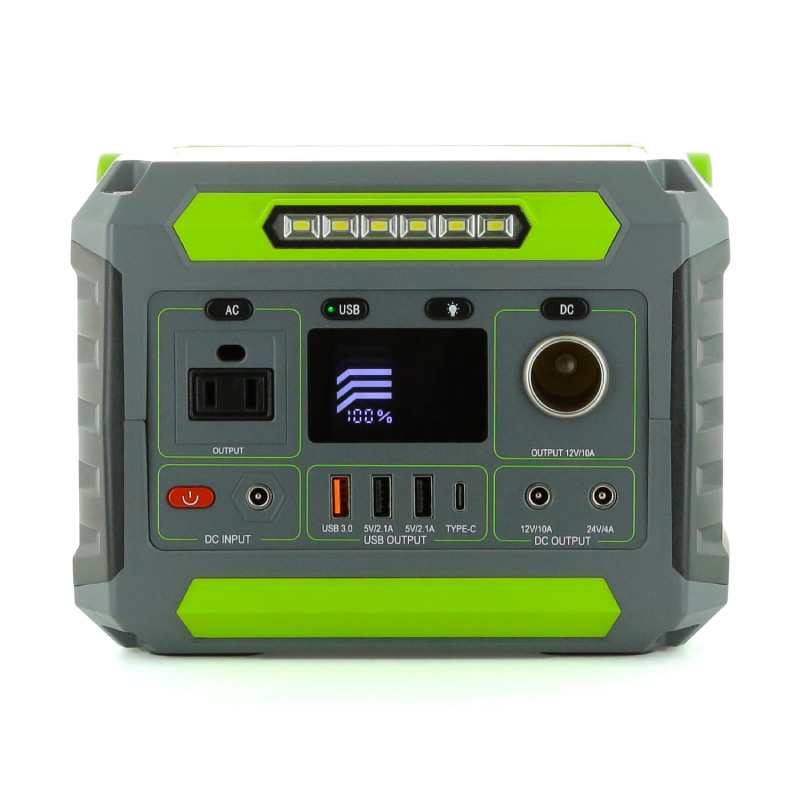
Portable power stations are like big battery boxes. They store electricityso you can use it later. These devices are very handy during power outagesor when camping. They can charge phones, laptops, and even small appliances.
Most portable power stations have a rechargeable batteryinside. They come with different ports for plugging in devices. Common ports include USB, AC outlets, and DC carports. Some models have solar panel connections. This lets you recharge them using the sun. They often have LED screensto show battery status. This helps you know how much power is left.
Credit: antigravitybatteries.com
Usb Hub Compatibility
Portable power stations can often work with USB hubs, enabling multiple device connections simultaneously. Compatibility depends on the power station’s output specifications and the hub’s requirements. Ensure both devices are rated for the same voltage and current for optimal performance.
Understanding Usb Hubs
USB hubs help connect many devices to a single port. They split one USB port into several. This is useful for connecting multiple gadgets. Some hubs need power to work well. Others use power from the connected device. Compatibility depends on the power station’s output. Check if your hub needs extra power.
Types Of Usb Ports On Power Stations
Power stations can have different USB ports. Some have the old, big USB-A ports. Others include newer USB-C ports. USB-C can charge faster and connect to more devices. Some power stations offer both types. This helps connect old and new devices. Check your power station’s ports before using a hub.
Connecting Usb Hubs To Power Stations
Portable power stations can effectively power USB hubs, offering a convenient solution for charging multiple devices on the go. Ensure compatibility with the USB hub’s power requirements to optimize performance.
Steps To Connect
Start by ensuring the power stationis fully charged. Locate the USB port on the power station. Connect one end of the USB cable to this port. Insert the other end into the USB hub. Ensure the connection is secure and snug. Check if the USB hub is functioning. If not, try a different cable. This can often solve connection problems. Keep the power station in a stable place. Avoid bending the cables too much.
Potential Issues And Solutions
Sometimes, the USB hub might not get enough power. This can cause devices to not charge properly. Try using a shorter cable for better power flow. Some hubs need more power than others. Check the hub’s manual for power requirements. If devices still don’t work, try a different power station. Make sure the power station supports the hub’s power needs. Keep all devices and cables in good condition. This helps prevent connection issues.
Performance And Efficiency
Portable power stations can efficiently power USB hubs, ensuring multiple devices charge simultaneously. This setup enhances gadget performance while maintaining energy efficiency, making it a practical solution for tech-savvy individuals on the go.
Power Delivery Capabilities
Portable power stations can connect to USB hubs easily. They give energy to many devices at once. This helps when charging phones, tablets, and laptops. The power stations have strong batteries. These batteries store lots of energy. They deliver energy safely to USB hubs. This makes them efficient in powering your gadgets.
Impact On Charging Speed
Charging speed can be affected by the power station. Some power stations have fast charging options. This means your devices charge quickly. But, using multiple devices can slow charging. The USB hub divides the energy among devices. So, sometimes charging takes longer. But still, it’s useful for many devices.
Common Challenges
Connecting portable power stations to USB hubs can be tricky. Compatibility issues often arise due to different power requirements. Some devices may not charge efficiently, causing frustration for users.
Overloading Concerns
Portable power stations can face overloading issueswith USB hubs. Each USB port has a limit. If too many devices connect, the power station might stop working. It’s crucial to check the power capacity. Always ensure that total power demand does not exceed the station’s output.
Compatibility Problems
Not all USB hubs work well with portable power stations. Some devices need specific power requirements. If the USB hub is not compatible, devices might not charge. Check if the hub and devices are compatiblewith your power station. This ensures smooth operation without hiccups.

Credit: vtoman.com
Choosing The Right Portable Power Station
Look for a power station with enough capacity. Check if it can charge multiple devices. Ensure it has USB ports. Consider the battery type for longer usage. Verify the weight for easy transport. Check safety features like overcharge protection.
- EcoFlow Delta – Known for high capacity and fast charging.
- Jackery Explorer – Offers compact size and reliable performance.
- Goal Zero Yeti – Provides versatile ports and durable design.
Future Trends
Exploring future trends, portable power stations are now compatible with USB hubs, offering efficient energy solutions. This innovation supports multiple devices, making it a practical choice for tech-savvy users.
Technological Advancements
Portable power stations are getting smarter. They now support USB hubs. This means more devices can connect at once. New models have faster charging speeds. Some even have solar panel options. This helps when camping or during power cuts. Battery life is improving too. They last longer and charge quicker.
Market Predictions
The market for power stations is growing. More people need portable power. Prices are expected to drop. This will make them more affordable. New designs will be lighter and more compact. People will use them for travel and emergencies. Demand for these devices will increase. Companies will innovate to meet this demand.
Frequently Asked Questions
Can You Use A Usb Hub As A Power Supply?
A USB hub can provide power to devices, but it’s not a substitute for dedicated power supplies. Most hubs offer limited power, insufficient for high-demand gadgets. Always check the hub’s specifications to ensure it meets your device’s power requirements. For charging, use a hub with external power input.
What Are The Downsides Of Usb Hubs?
USB hubs can reduce data transfer speed due to shared bandwidth. Power limitations may prevent charging multiple devices. Compatibility issues might arise with some devices, leading to connectivity problems. Overloading a hub can cause overheating, affecting performance and safety. Quality varies, so choose reputable brands for reliability.
How To Add External Power To Usb Hub?
Connect the USB hub to an external power adapter through the designated power input port. Ensure compatibility between the adapter’s voltage and the hub. Securely plug the adapter into a reliable power outlet for consistent performance. This setup provides ample power to support multiple connected USB devices efficiently.
What Can Be Plugged Into A Usb Hub?
A USB hub can connect devices like keyboards, mice, printers, external hard drives, and flash drives. You can also plug in cameras, smartphones, tablets, and game controllers. It allows multiple devices to connect to a computer through a single USB port, enhancing connectivity and convenience.
Conclusion
Portable power stations work well with USB hubs. They provide convenience and flexibility. Many devices can charge simultaneously. This makes them ideal for travel or emergencies. Check compatibility before use. Match power requirements to avoid issues. A good understanding ensures seamless operation.
Portable power stations offer a practical solution. USB hubs enhance their functionality. Together, they meet modern charging needs efficiently. Always prioritize safety when connecting devices. Proper use extends device life and reliability. Consider investing in both for optimal use. They make staying connected easier.
A smart choice for tech-savvy users.