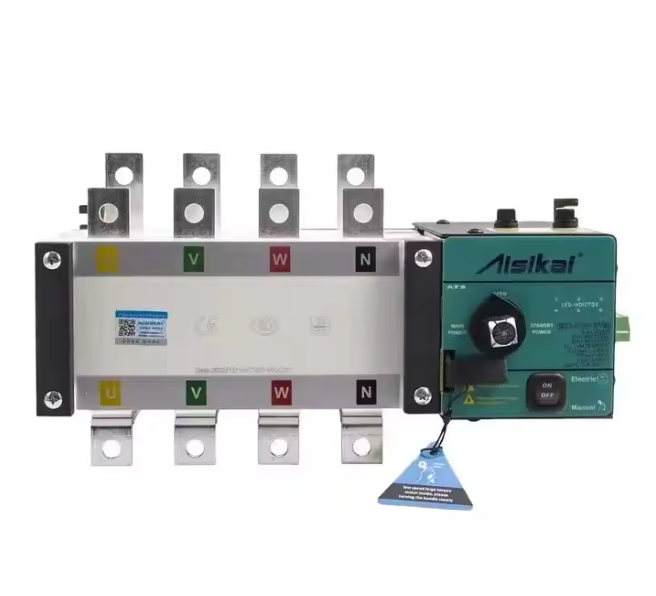
When it comes to managing your home’s power supply during an outage, transfer switches play a crucial role. But, have you ever wondered if these transfer switches have LED indicators?
Imagine being able to effortlessly monitor your power system at a glance. LED indicators on transfer switches could be the game-changer you didn’t know you needed. We will explore whether transfer switches come equipped with these handy indicators and how they can simplify your life.
You’ll discover how LED indicators can provide peace of mind, ensuring your home’s power system is not just functional but also efficient and user-friendly. Dive in to uncover the truth behind these illuminating features and see how they can transform your power management experience.

Credit: www.se.com
What Are Transfer Switches
Transfer switches are devices that help change power sources safely. They connect your home or building to either the main power or a backup generator. This switch prevents electricity from both sources mixing together, which can be dangerous.
They are important during power outages. The transfer switch moves the power supply to your backup generator quickly and safely. It makes sure your appliances keep working without interruption.
These switches come in different types:
- Manual transfer switches: You switch the power source yourself.
- Automatic transfer switches: They switch power on their own when needed.
Transfer switches are found in homes, businesses, and hospitals to keep power steady and safe.
Purpose Of Led Indicators
LED indicatorson transfer switches help users see the switch status easily. They show if power is coming from the main source or the backup generator.
This visual cue makes it simple to know if the switch is working right. It can also warn of any problems like power failure or switch faults.
- Show power source status
- Signal switch operation
- Alert for faults or issues
- Help with quick troubleshooting
LEDs provide clear, fast information without needing tools or tests. This makes using transfer switches safer and easier.
Types Of Transfer Switches With Leds
Manual transfer switchessometimes have LED indicators. These LEDs show if the switch is onor off. They help users see the switch status quickly. Manual switches need someone to change the power source by hand. The LED lights make it easier to know if the switch is working properly.
Automatic transfer switchesusually come with LED indicators. These LEDs tell if the switch is operatingor if there is a power issue. Automatic switches change power sources without help. The LEDs help in monitoringthe switch’s condition and fault detection. This makes sure power flows smoothly.
How Led Indicators Work
LED indicatorson transfer switches show the switch’s status quickly. These lights help users see if power is flowing through the switch or if there is a problem.
Each LED light has a simple role:
- Green LEDmeans the transfer switch is working normally.
- Red LEDsignals a fault or error in the system.
- Yellow LEDmay show that the switch is in standby or waiting mode.
The LEDs get power from the switch’s circuits. They turn on or off based on the switch’s current condition. This makes it easy to check the switch at a glance without special tools.
Benefits Of Led Indicators In Transfer Switches
LED indicatorsin transfer switches help users see the current state easily. They improve safetyby showing if power is on or off. This prevents accidents and wrong handling.
Troubleshooting is easier with LED lights. They show errorsor problems quickly. This helps fix issues faster without much guesswork.
Real-time status monitoring is possible with LEDs. Users can watch the power flow at any moment. This keeps systems running smoothly and avoids surprises.

Credit: gohigherconstruction.com
Common Led Indicator Colors And Meanings
Transfer switchesoften have LED indicatorsto show their status. These lights help users know if the switch is working correctly.
- Greenmeans the switch is powered and ready.
- Redshows there is a fault or error.
- Yellowor amber signals the switch is in transfer modeor waiting.
- Bluemay indicate manual overrideor special mode.
These colors give quick information without needing to read manuals. They help to keep power safeand avoid damage.
Installation Tips For Transfer Switches With Leds
Transfer switches with LED indicatorshelp show power status clearly. Always turn off powerbefore starting installation. Use a voltage testerto confirm no electricity flows.
Install the switch near the main panel for easy access. Connect the input wiresto the generator and the output wiresto your home circuit. Make sure all connections are tight and secure.
The LED lightsshow if power comes from the grid or generator. Follow the manufacturer’s guidefor wiring colors and LED functions. Check the LEDs after installation to ensure correct operation.
- Use insulated tools for safety
- Double-check all wire connections
- Keep the switch dry and protected
- Test the switch before full use
Troubleshooting Led Indicator Issues
Check the power source. The LED indicator needs power to work. Make sure the transfer switch is plugged in correctly and the main power is on.
Inspect the LED light. Sometimes the LED bulb can burn out or get loose. Look for any damage or dirt blocking the light.
Verify the wiring. Loose or broken wires can stop the LED from lighting up. Tighten all connections and replace any damaged wires.
Use a multimeterto test voltage. This tool helps check if electricity reaches the LED.
- Test across LED terminals for voltage.
- If no voltage, trace back to the power source.
- Check for blown fuses or tripped breakers.
Reset the transfer switchif it has a reset button. This can fix minor glitches causing LED failure.
Consult the manualfor specific LED codes or error signals. Each model may use different blinking patterns.

Credit: brhtransformer.en.made-in-china.com
Frequently Asked Questions
Do Transfer Switches Have Led Indicators?
Yes, many transfer switches include LED indicators. These lights show power status, source selection, and operational alerts. LEDs help users quickly identify the switch’s condition, improving safety and convenience during power transfers.
What Do Led Indicators On Transfer Switches Mean?
LED indicators typically signal power availability, source connection, and fault conditions. Green often means normal operation, while red or amber can indicate issues. These lights help users monitor the transfer switch’s status at a glance.
Are Led Indicators Standard On All Transfer Switches?
Not all transfer switches have LED indicators. Basic models might lack them, while advanced or automatic switches usually feature LEDs. It depends on the switch’s design and intended use for user feedback and diagnostics.
How Do Led Indicators Improve Transfer Switch Use?
LED indicators provide real-time visual feedback, making it easy to monitor power status. They reduce guesswork during power outages, enhance safety, and help quickly identify problems, ensuring smooth and reliable power switching.
Conclusion
Transfer switches often include LED indicators to show power status clearly. These lights help users know if the switch works properly. They make it easy to see when power moves between sources. LED indicators improve safety and reduce guesswork during outages.
Choosing a transfer switch with LEDs can save time and worry. Simple signals keep you informed at a glance. This small feature adds big convenience to your power setup.