
Are you frustrated with power outages and looking for a reliable solution? Generac standby generators are a great choice, but to get the most out of them, you need to know how to adjust their settings.
Imagine the peace of mind knowing your home is always powered, even when the grid fails. This guide will walk you through the simple steps to optimize your Generac generator’s performance. With easy-to-follow instructions, you’ll gain confidence and control over your generator, ensuring your home stays safe and comfortable.
Dive into the article to unlock the secrets of seamless power management and never worry about unexpected blackouts again.
Credit: www.generac.com
Generac Standby Generator Basics
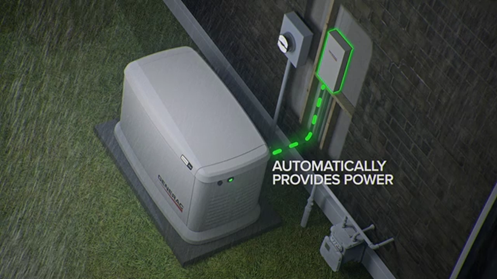
Generac standby generatorshave key parts that work together. The enginecreates power. The alternatorturns engine energy into electricity. The transfer switchmoves power to your home safely.
The control panelshows the generator’s status. It helps you start, stop, and setdifferent functions. You can check oil level, battery,and error codeson it.
| Common Models | Power Output | Fuel Type |
|---|---|---|
| Guardian Series | 7kW – 22kW | Natural Gas / Propane |
| Core Power Series | 8kW – 20kW | Natural Gas / Propane |
| XP Series | 22kW – 25kW | Natural Gas / Propane |

Credit: www.generac.com
Accessing Generator Settings
The control panel on Generac standby generators lets users view and adjust settings. It has a simple display with buttons for navigation. Use arrow keys to scroll through options. Press ‘Enter’ to select an item. Settings include run time, voltage, and alerts. Adjust values by pressing up or down buttons.
The mobile app interface offers remote control. It connects via Wi-Fi or cellular network. Users can check status, start or stop the generator, and change settings. The app shows real-time dataand alerts for maintenance needs.
Safety is key when adjusting settings. Always turn offthe generator before making changes. Avoid touching live wires or terminals. Use insulated tools if needed. Read the user manual carefully for safety instructions.
Adjusting Runtime And Test Modes
Adjusting the runtime durationlets the generator run for a set time during power outages. This helps save fuel and keeps the generator ready. Use the control panel to set the hours and minutes for runtime.
Test cycles check if the generator works properly. Scheduling test cycles keeps the generator healthy without manual checks. Set test times during low-demand hours to avoid disruptions.
Changing the test frequency controls how often the generator runs self-tests. You can choose daily, weekly, or monthly tests. More frequent tests catch problems sooner but use more fuel.
Configuring Voltage And Frequency
Adjusting voltage on a Generac standby generator requires careful steps. Begin by turning off the generator and unplugging it. Locate the voltage adjustment screws inside the control panel. Use a screwdriver to turn the screws slowly to increase or decrease voltage output. Check the voltage with a multimeter to ensure it stays within safe limits. Avoid setting voltage too high or too low to protect your appliances.
Frequency settings must match the power system. Most Generac generators run at 60 Hz in the US. Some models allow frequency adjustments through the control board. Make sure the frequency is steady to avoid damage to sensitive equipment.
Ensuring compatibility is key. Confirm the generator voltage and frequency meet your home or business needs. Use the owner’s manual to verify these settings. Incorrect settings can cause poor performance or damage.
Managing Alerts And Notifications
Enabling alertsin your Generac standby generator helps you stay informed. Access the control panel menu and select the alert settings. Turn on the types of alerts you want, such as maintenance reminders or fault warnings. This keeps you ready for any issues.
Customizing notification preferenceslets you choose how to get alerts. You can select email, text message, or on-screen notifications. Adjust the alert volume and frequency to suit your needs. This way, you only get important messages without extra noise.
Troubleshooting alertsstarts by reading the alert message carefully. Check the user manual for guidance on each alert code. Common fixes include checking fuel levels, battery status, or resetting the system. Contact support if alerts keep appearing after basic checks.
Optimizing Fuel And Maintenance Settings
Select the correct fuel typeto ensure your generator runs smoothly. Most Generac standby generators use natural gasor propane. Choose the fuel type based on your home’s supply and setup. Using the right fuel helps the generator work efficiently and last longer.
Set maintenance remindersto keep the generator in good shape. These alerts notify you when oil changes, filter replacements, or system checks are due. Following these reminders helps avoid breakdowns and costly repairs.
Auto-shutdown parametersprotect your generator from damage. Set the system to turn off if it overheats or runs too long without rest. This feature saves fuel and prevents parts from wearing out quickly.
Resetting And Updating Firmware
Performing a factory reset restores the generator’s settings to the original state. This step fixes many issues caused by incorrect settings. Before the reset, save any important settings. The reset process usually requires holding down specific buttons for a few seconds. Check the manual for exact instructions. After reset, the generator may restart automatically.
The firmware update process keeps the generator software current. Updated firmware improves performance and fixes bugs. To update, connect a USB drive or use Wi-Fi if available. Download the latest firmware from the official Generac website. Follow the on-screen prompts to complete the update. Do not turn off the generator during the update.
| Backup Settings | Restore Settings |
|---|---|
|
|
Troubleshooting Common Issues
Error codeshelp identify problems quickly. Each code shows a specific issue.
| Error Code | Meaning |
|---|---|
| E01 | Low oil pressure |
| E02 | High engine temperature |
| E03 | Battery voltage low |
| E04 | Generator overload |
Connectivity problemsmay cause poor communication. Check cables and Wi-Fi signal strength.
- Restart the generator and router.
- Verify generator settings match your network.
- Move router closer if signal is weak.
Call supportif error codes persist after resets. Also, seek help for unusual noises or smells.

Credit: grastengenerators.com
Frequently Asked Questions
How Do I Access Settings On Generac Standby Generators?
To access settings, use the control panel located on the generator. Press the menu button to navigate through options. Use arrow keys to select and adjust parameters easily.
Can I Adjust The Generator’s Automatic Start Time?
Yes, you can set the automatic start time through the control panel. Navigate to the start time menu and input your desired schedule for automatic operation.
How Do I Change The Fuel Type Setting On Generac Generators?
Fuel type settings are preset based on the model and usually cannot be changed manually. Consult your user manual or a professional for fuel type specifics.
What Safety Settings Should I Configure On My Generator?
Enable overload protection and low oil shutdown features. These settings protect your generator from damage and ensure safe operation during power outages.
Conclusion
Adjusting settings on your Generac standby generator keeps it running smoothly. Start with simple steps and follow the user guide closely. Check settings regularly to avoid unexpected issues. Small changes can improve performance and save energy. Always ensure safety by turning off the generator first.
Regular care helps your generator last longer and work better. Stay prepared for power outages with proper settings. Keep your home safe and comfortable without hassle. Easy to do, worth the effort.