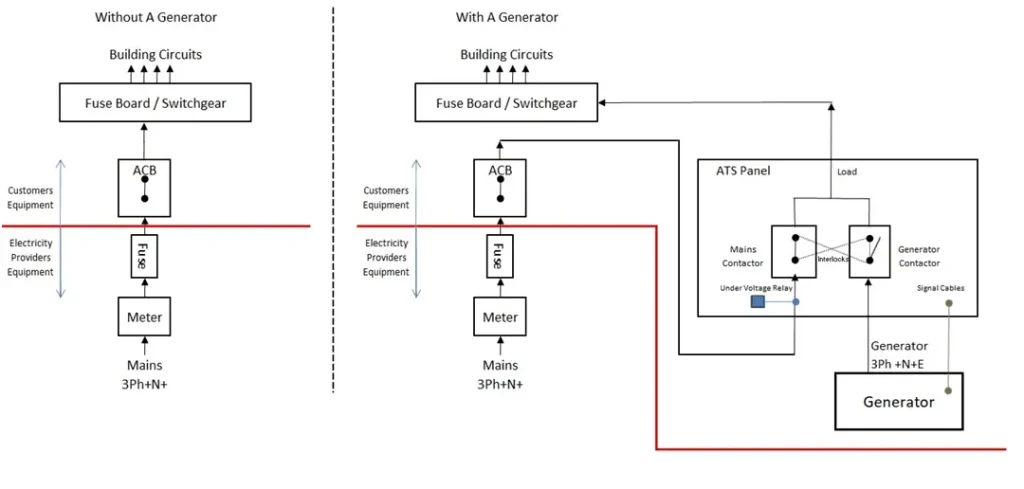
Are you tired of power outages disrupting your daily life or business operations? Imagine having the peace of mind that comes with knowing your generator is ready to kick in automatically when the electricity goes out.
The secret lies in configuring your generator’s Automatic Transfer Switch (ATS) settings correctly. This guide is tailored just for you, ensuring you don’t miss a step in setting up this vital component. You’ll discover how to optimize your generator’s performance, ensuring seamless transitions and uninterrupted power.
Dive into this step-by-step guide and empower yourself with the knowledge to keep the lights on, no matter what. Keep reading to find out how you can take control of your power needs effortlessly.

Credit: onccy.com
Generator Ats Basics
ATSstands for Automatic Transfer Switch. It helps switch power supply from the main source to a generator during outages. This switch keeps your power steady without manual help. It works fast to avoid any power loss.
Key parts of an ATS include:
- Controller– manages the switching process.
- Switch contacts– physically change the power source.
- Voltage sensors– detect power failures.
- Timer– controls delay times for switching.
Proper ATS settingsare very important. They protect your equipment from damage. Correct settings ensure smooth power switching. They also help avoid overloads and false trips. Setting the ATS right saves time and money on repairs.
Preparing For Configuration
Always prioritize safetybefore starting any ATS configuration. Wear protective gearsuch as gloves and goggles. Make sure the generator and ATS are powered offto avoid electric shock. Work in a dry areato reduce hazards. Keep a fire extinguishernearby for emergencies. Never work alone; have someone nearby for help.
- Screwdriversand wrenchesfor panel access
- Multimeterto check electrical values
- Insulated toolsto prevent shocks
- Flashlightfor clear visibility
- Manualor guidebookof the ATS model
Read the manualcarefully before starting. It contains step-by-step instructionsand important warnings. Understanding the manual helps avoid mistakes. Each ATS model may have different settingsand requirements. Follow the manufacturer’s guidelinesclosely to ensure proper setup.
Step-by-step Ats Setup
Start by opening the ATS control panel using the main power switch. Use the keypad to enter the setup menu. Navigate carefully to avoid errors.
Set the correct voltage values for your generator and mains power. These should match your system’s requirements exactly. Incorrect values can cause failures.
Adjust transfer delays to protect your equipment. Delays prevent sudden power changes. Choose values based on your generator and load needs.
Assign priorities to your loads. This ensures critical devices get power first. Use the ATS interface to rank loads from highest to lowest priority.
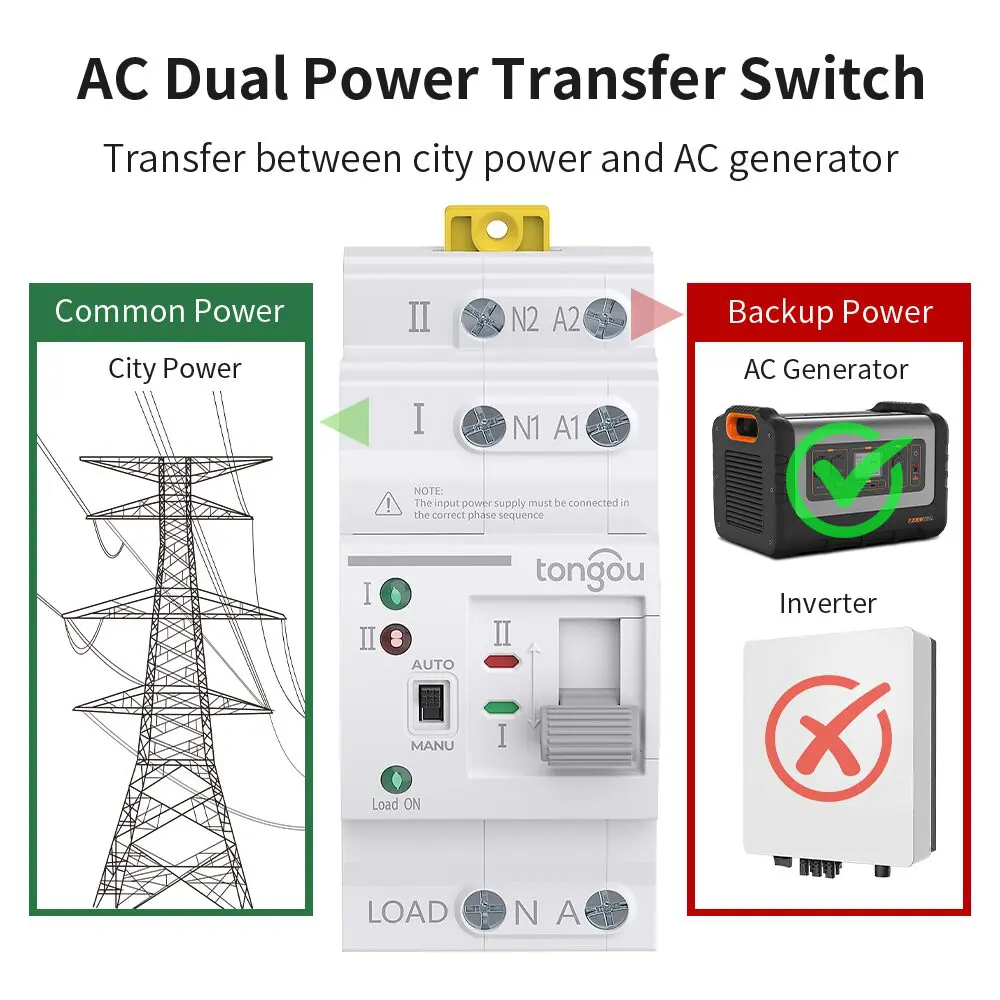
Test the ATS by simulating power failure and restoration. Check if the generator starts and power transfers smoothly. Fix any issues before normal use.
Credit: www.tongou.com
Troubleshooting Common Issues
Fault codeshelp find problems in the ATS quickly. Each code shows a specific issue. Check the ATS manual to understand these codes. Clear the fault codes after fixing the problem to reset the system.
Resetting the ATS can fix many common errors. Turn off the power supply first. Wait a few seconds. Turn the power back on. This resets the ATS and clears minor faults.
Transfer failureshappen when the ATS does not switch power sources properly. Causes include low battery, loose wires, or wrong settings. Check connections and settings carefully. Test the battery voltage and replace if weak.
Maintenance Tips For Ats
Regular inspection helps catch problems early. Check the ATS for any signs of wear or damage. Look at connections, switches, and wiring carefully. Keep a log of each inspection to track changes over time.
Cleaning and lubrication keep the ATS running smoothly. Use a soft brush or cloth to remove dust and dirt. Lubricate moving parts with a light oil to avoid rust and friction. Clean contacts ensure good electrical flow.
| Firmware Update | Why It Matters | How Often |
|---|---|---|
| Check for updates | Fix bugs and improve performance | Every 6 months or as needed |
| Use official sources | Ensure safety and compatibility | Only from manufacturer websites |
| Follow instructions carefully | Prevent errors during update | Read manuals before starting |

Credit: www.micksgonebush.com.au
Frequently Asked Questions
What Is Ats In Generator Settings?
ATS stands for Automatic Transfer Switch. It automatically switches power between the main source and generator during outages. Configuring ATS ensures seamless power transfer and prevents downtime. Proper ATS setup improves generator efficiency and safety.
How To Set Generator Ats Voltage Thresholds?
Set voltage thresholds based on your system requirements. Typically, set low voltage to trigger generator start. High voltage threshold stops the generator. Adjust these values to avoid false triggers and protect equipment.
Why Configure Generator Ats Time Delays?
Time delays prevent unnecessary generator starts due to short power fluctuations. Configure delays for transfer, generator start, and return to normal power. Proper timing enhances system reliability and reduces wear on the generator.
Can Ats Settings Affect Generator Fuel Efficiency?
Yes, correct ATS settings optimize generator run time. Avoid frequent starts and stops by setting appropriate thresholds and delays. This reduces fuel consumption and extends generator life.
Conclusion
Configuring generator ATS settings ensures power reliability and safety. Proper setup helps avoid downtime and equipment damage. Regular checks keep the system working smoothly. Follow the steps carefully and adjust settings as needed. This helps your generator switch power sources without issues.
Understanding the basics makes the process easier and safer. Stay consistent with maintenance to extend your system’s life. Simple settings can prevent big problems later on. Trust your setup to keep power steady and secure.