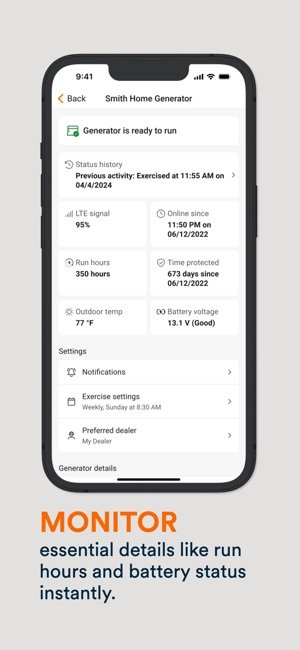
Are you tired of the constant worry about your generator’s performance and reliability? Imagine having the power to monitor your generator’s status right from your smartphone.
Connecting your generator monitoring system to an app can give you that peace of mind. It’s more than just a convenience; it’s a game-changer. You’ll gain real-time insights, receive alerts, and ensure your power backup is always ready when you need it most.
In this guide, you’ll discover how easy it is to make this connection and why it’s a smart move for anyone who relies on a generator. Dive in, and take the first step towards smarter generator management.
Choosing The Right Generator Monitoring System
Generator monitoring systemscome in different types. Some track fuel levels, others check engine performanceor power output. Choose a system that fits your needsand budget.
Important features include real-time alerts, easy installation, and data logging. These help you catch problems early and keep the generator running well.
| Feature | Why It Matters |
|---|---|
| Real-time Alerts | Notifies you immediately about issues |
| Easy Installation | Saves time and effort during setup |
| Data Logging | Tracks generator history for maintenance |
Ensure the system works with mobile apps. This allows you to check statusand receive alertsfrom anywhere. Compatibility with both Androidand iOSis best for wider access.

Credit: apps.apple.com
Preparing Your Generator For Connection
Start by checking the power sourceof your generator. Make sure it is stable and within the right voltage range. Confirm all signal wiresare properly connected and undamaged. This helps the monitoring system get accurate data.
Next, test network availability. The monitoring system needs a strong and steady internet connection. Check Wi-Fi or Ethernet cables for good links. Without a network, the app cannot receive real-time updates.
Follow key safety precautionsbefore connecting. Turn off the generator and unplug it from the power source. Wear protective gear like gloves and goggles. Avoid touching live wires to prevent shocks or injuries.
Installing The Monitoring Hardware
Start by choosing a safe and stable spot to mount the sensors and devices. Make sure the surfaces are clean and dry. Use screws or strong adhesive to fix the hardware firmly. Position sensors where they can easily detect generator status without obstruction.
For wiring, use cables that fit the device specifications. Keep wires tidy and avoid sharp bends to prevent damage. Connect wires following the device manual carefully to avoid errors. Use cable ties or clips to hold wires neatly in place.
Test the hardware by powering on the generator and monitoring devices. Check if sensors send data correctly to the app. Look for blinking lights or app notifications that show the system works well. Fix any loose connections or errors found during testing.

Credit: intelligentcontrols.io
Downloading And Setting Up The App
Search the app store for the exact generator monitoring system app. Check the developer’s name for authenticity. Read user reviews to confirm it works well.
Create an account by entering your email addressand choosing a strong password. Verify your email through the link sent to your inbox. This step keeps your data safe.
Adjust the app settings to match your preferences. Set up notifications for alertsand status updates. Connect the app to your generator using the provided instructions. Save changes before exiting.
Pairing The Generator System With The App
Start by turning on the generator monitoring system and your app. Choose either Wi-Fior Bluetoothto connect. For Wi-Fi, select the generator’s network from your device’s list. Enter the password if needed. For Bluetooth, make sure both devices are close and Bluetooth is enabled.
Sometimes, connections fail. Check if the generator and app are updated. Restart both devices to refresh settings. Move closer to avoid weak signals. Turn off other Bluetooth devices to reduce interference.
Look for a confirmation message on the app. The app may show the generator’s status or data. Test by checking if the app updates generator info in real time. If data appears, pairing is successful.
Customizing Alerts And Notifications
Set clear thresholds for alertsto catch issues early. Choose values for temperature, fuel level, or runtimethat trigger notifications. This helps you react quickly to problems.
Pick notification methodsthat suit your needs. Options include email, SMS, or app push alerts. Use multiple methods to ensure you don’t miss important messages.
Keep track of all alerts in an alert history. This record helps you review past problems and spot patterns. You can easily see when and why alerts happened.
| Alert Feature | Description |
|---|---|
| Thresholds | Set limits for key generator data like temperature or fuel |
| Notification Methods | Email, SMS, push alerts for instant updates |
| Alert History | Logs past alerts for review and analysis |
Maintaining Your Monitoring System
Keep your generator monitoring system running smoothly with regular software updates. These updates fix bugs and add new features. They protect your system from security risks. Set reminders to check for updates often.
Hardware inspection and cleaning are key. Check cables and connections for damage or dirt. Clean dust and debris from sensors and screens carefully. A clean system works better and lasts longer.
Backup and data security protect your important information. Save your data in multiple places, like a cloud or external drive. Use strong passwords and change them regularly. This keeps your data safe from loss or theft.

Credit: apps.apple.com
Common Issues And Solutions
Connectivity problemsoften occur due to weak Wi-Fi signals or incorrect network settings. Check the router and move closer if the signal is low. Restarting the generator monitoring system and the app can also fix issues. Make sure the app has permission to access the internet.
App crashes or freezes might happen because of outdated software or too many apps running at once. Close other apps to free up memory. Update the app regularly to get the latest fixes. If the app keeps crashing, try reinstalling it.
Inaccurate monitoring data can result from sensor problems or poor calibration. Clean the sensors and check their connections. Recalibrate the system following the manufacturer’s instructions. Sometimes, updating the app helps fix data errors.
Frequently Asked Questions
How Do I Connect A Generator Monitoring System To An App?
To connect, first install the monitoring device on your generator. Then, download the compatible app. Use Wi-Fi or Bluetooth to sync the device with the app. Follow the in-app setup instructions to complete the connection and start monitoring remotely.
What Are The Benefits Of App-based Generator Monitoring?
App-based monitoring allows real-time status updates and alerts. It improves maintenance scheduling and reduces downtime. Remote access helps manage multiple generators from anywhere. This system enhances efficiency and prevents unexpected failures by providing timely notifications.
Which Apps Support Generator Monitoring Systems?
Many brands offer proprietary apps like Generac Mobile or Kohler Power. Third-party apps such as Sense or SmartGen also support various systems. Always check compatibility with your generator model before downloading an app to ensure proper functionality.
Can I Monitor Multiple Generators On One App?
Yes, most generator monitoring apps support multiple devices. You can view each generator’s status individually on a single dashboard. This feature is ideal for businesses managing several generators simultaneously, streamlining monitoring and maintenance tasks.
Conclusion
Connecting a generator monitoring system to an app helps track performance easily. You get real-time updates on fuel, power, and maintenance needs. This keeps your generator running smoothly and saves time. Setting up the connection is simple if you follow the right steps.
Stay informed and avoid unexpected problems with the app. This way, you protect your investment and enjoy peace of mind. Small efforts lead to big benefits. Start monitoring today for better control tomorrow.