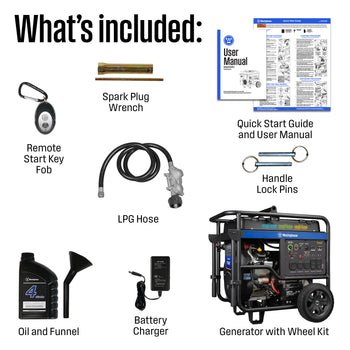
Imagine being able to start your gas generator without stepping outside, especially during bad weather or late at night. Connecting a remote start to your gas generator gives you that power and convenience.
If you’ve ever wished for an easier way to control your generator, this guide is for you. You’ll learn simple, clear steps to set up a remote start system that works smoothly every time. Keep reading, and soon you’ll enjoy the comfort of starting your generator from anywhere in your home.

Credit: www.rvmp.co
Choosing The Right Remote Start Kit
Choosing a remote start kit means checking compatibilitywith your gas generator. Not all kits work with every model. Match the kit to your generator’s voltageand start type. Some kits suit electric startgenerators only, while others fit manual starttypes.
Key features to considerinclude:
- Range of remote signal
- Ease of installation
- Battery life of the remote
- Safety features like auto-shutdown
- Weather resistance for outdoor use
| Remote Start Kit | Compatible Generator Type | Signal Range | Price Range |
|---|---|---|---|
| GenStart Pro | Electric and Manual | 500 feet | $$ |
| EasyStart 3000 | Electric only | 300 feet | $ |
| SafeRemote X | Manual and Electric | 400 feet | $$$ |
Preparing Your Gas Generator
Always prioritize safetybefore working with a generator. Ensure the generator is turned offand coolto avoid burns or shocks. Use protective glovesand eye protection. Work in a dryarea to prevent electric hazards.
Identify the remote start connection pointson your gas generator. These points are usually near the control panelor inside the starter motor housing. Consult your generator’s manual to find exact locations.
| Tools Needed | Purpose |
|---|---|
| Screwdriver | Remove panels and access connection points |
| Wire stripper | Prepare wires for connections |
| Multimeter | Check electrical connections and voltage |
| Insulated gloves | Protect from electric shock |
Wiring The Remote Start System
Start by locating the wires and terminalson both the generator and the remote start system. Each wire usually has a color code or label. Match these labels carefully to avoid mistakes. Common wires include power, ground, and start signal.
The control module connects the wires between the remote start and the generator. Use the manualto find exact connection points. Secure each wire to the correct terminal. Loose connections can cause the system to fail.
After all wires are connected, fasten them neatlyto prevent damage. Use cable ties or clips to keep wires from moving or touching hot parts. Double-check all connections for tightness and safety before testing the system.
Configuring The Remote Start Settings
To program the remote, first match the remote’s code with the generator. Use the generator’s manual to find the right code. Press the remote buttons to sync with the generator. Wait for a light or beep confirming the connection.
Testing the signal rangeis key. Walk around with the remote near your generator. Check if the generator starts or stops as expected. If the signal is weak, try moving closer or removing obstacles like walls.
Adjust the start and stop parametersfor safety and convenience. Set how long the generator runs before stopping. Choose the delay time between start and stop commands. Make sure these settings suit your needs and the generator’s limits.
Troubleshooting Common Issues
Remote not starting the generatorcan happen for many reasons. Check if the remote has fresh batteries. Sometimes, buttons get stuck or damaged, so inspect the remote carefully. Make sure the remote is within the correct range of the generator.
Signal interference problemscan block the remote’s signal. Other wireless devices, thick walls, or metal objects may cause this issue. Try moving closer to the generator or removing obstacles. Changing the frequency or channel on the remote may help reduce interference.
Power supply concernsmay stop the generator from starting remotely. Verify the generator’s battery is fully charged and connected properly. Inspect wiring for any loose or damaged connections. A weak or dead battery often causes remote start failure.

Credit: www.amazon.com
Maintenance Tips For Remote Start Systems
Regularly check the remote start system for any signs of wear. Look for loose wires, damaged connectors, or dirt buildup. Clean and tighten parts to ensure good contact. Test the system often to confirm it works properly.
Replace the battery in the remote control as needed. A weak battery can cause the system to fail. Use the correct battery type and insert it the right way. Keep spare batteries handy for quick replacement.
Keep the remote start system’s software updated. Updates fix bugs and add new features. Check the manufacturer’s website or app for the latest version. Follow their instructions carefully to install updates safely.

Credit: www.amazon.com
Frequently Asked Questions
How Do I Connect A Remote Start To A Gas Generator?
To connect a remote start, first locate the generator’s control panel. Identify the remote start terminals and connect the remote module wires accordingly. Secure connections and test the remote start function before regular use.
What Tools Are Needed For Generator Remote Start Installation?
You’ll need a screwdriver, wire strippers, electrical tape, and a multimeter. These tools help safely access terminals, strip wires, and verify proper connections for the remote start setup.
Can Any Gas Generator Support Remote Start?
Not all gas generators support remote start. Check your generator’s manual or manufacturer specifications to confirm compatibility before purchasing a remote start system.
Is Professional Help Required For Remote Start Installation?
While DIY is possible, professional help is recommended for safety and proper wiring. Incorrect installation can damage the generator or void warranties.
Conclusion
Connecting a generator remote start to a gas generator is simple. Follow the steps carefully. Ensure all connections are secure. This prevents any mishaps. Test the setup once complete. Ensure everything works smoothly. Regular maintenance helps in long-term reliability. Always refer to the manual for guidance.
Safety is crucial during installation. Use the right tools for the job. A well-connected system offers ease and convenience. Now, enjoy the benefits of remote starting. Make power access easier and safer. Keep this guide handy for future reference. A little effort brings a lot of convenience.