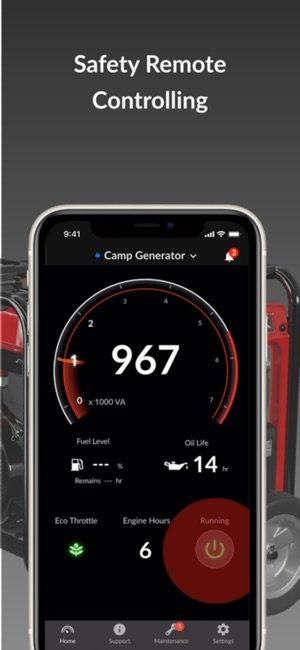
Are you looking for a simple way to monitor your generator right from your phone? Connecting a generator sensor to a mobile app can save you time and give you peace of mind.
Imagine checking your generator’s status instantly, no matter where you are. In this guide, you’ll discover easy steps to link your generator sensor with your mobile app quickly and confidently. Keep reading to take control of your power backup like never before.
Choosing The Right Generator Sensor
Choosing the right generator sensor ensures accurate data for your mobile app. Connect the sensor by pairing it via Bluetooth or Wi-Fi to your phone. Follow simple app instructions to sync and monitor your generator’s performance easily.
Types Of Generator Sensors
- Voltage sensorsmeasure the generator’s output voltage.
- Current sensorsdetect the flow of electric current.
- Temperature sensorsmonitor the generator’s heat levels.
- Vibration sensorscheck for unusual shaking or noise.
Key Features To Consider
Choose sensors with high accuracyto get reliable data.
Look for durabilityto withstand harsh environments.
Check if the sensor supports real-time monitoringfor fast updates.
Compatibility With Mobile Apps
Ensure the sensor uses Bluetoothor Wi-Fito connect easily.
The sensor should work with your phone’s operating system.
Simple app interface helps in quick setup and use.

Credit: upkeep.com
Preparing Your Generator For Sensor Installation
Safetyis very important before starting sensor installation. Always turn offthe generator and disconnect it from any power source. Wear protective glovesand glasses to avoid injuries. Keep the area clean and dryto prevent accidents. Never touch wires with wet hands.
Locate the right spotson the generator where the sensor will be fixed. These points must be cleanand free of rust. Check the manufacturer’s guidefor sensor placement. Make sure the sensor will not block any moving parts.
| Tools | Materials |
|---|---|
| Phillips screwdriver | Generator sensor kit |
| Wire stripper | Electrical tape |
| Multimeter | Cable ties |
| Drill (if needed) | Mounting brackets |
Installing The Generator Sensor
Begin by placing the generator sensorclose to the generator’s control panel. Make sure the surface is clean and dry before attaching the sensor. Use the provided adhesive or screws to secure the sensor firmly.
Next, connect the sensor wires to the generator’s output terminals. Check the wiring diagram in the manual to match the correct wires. Avoid loose connections to ensure accurate data transmission.
After wiring, power on the generator to test sensor functionality. The sensor should show real-time data on the mobile app once paired correctly.
- Do not place sensor near metal parts that cause interference.
- Avoid bending wires sharply to prevent damage.
- Ensure sensor is not exposed to water or extreme heat.
- Double-check wiring polarity before powering on.
Connecting The Sensor To Your Mobile App
First, download the appfrom the app store or official website. Make sure the app matches your sensor model. The app must be installed properlyto work well.
To pair the sensor, turn on Bluetooth or Wi-Fi on your phone. Open the app and follow the instructions to connect. Keep the sensor close to your phoneduring pairing.
| Troubleshooting | Solutions |
|---|---|
| Sensor not detected | Check if Bluetooth/Wi-Fi is on; restart the sensor |
| App won’t connect | Close and reopen app; update app if needed |
| Slow or no data | Move closer to sensor; check battery levels |
Configuring Sensor Settings On The App
Set up alerts and notificationsto get real-time updates. Choose sound or vibration alerts. Set thresholds for voltage, temperature, or runtime to avoid issues. Alerts help keep your generator safe and running well.
Customize how data shows on your app screen. Pick which details are most important, like fuel level or power output. Use simple charts or numbers for easy understanding. Adjust colors or fonts for better visibility.
Monitor your generator’s performance by checking key data regularly. Watch for changes in fuel use, power quality, and running hours. Use graphs to see trends over time. Early detection helps prevent big problems.

Credit: apps.apple.com
Maintaining Your Sensor And App Connection
Regular calibrationkeeps the sensor accurate. Check sensor readings often. Adjust settings if data seems off. Calibration ensures reliable results every time.
Always keep your mobile app updated. Updates fix bugs and add new features. This helps the app work well with the sensor. Regular updates improve stability and security.
Maintain strong connectivitybetween the sensor and app. Use Wi-Fi or Bluetooth with good signal strength. Avoid barriers that block signals. Stable connection means real-time data and alerts.

Credit: wlius.com
Frequently Asked Questions
How Do I Connect A Generator Sensor To A Mobile App?
To connect, first install the sensor on your generator. Then, pair it with the app via Bluetooth or Wi-Fi. Follow the app’s setup instructions to sync data and monitor generator status remotely.
What Types Of Sensors Work With Generator Apps?
Common sensors include vibration, temperature, and fuel level sensors. Ensure your sensor supports wireless communication compatible with your mobile app for real-time monitoring.
Can I Monitor Generator Status Remotely Via Mobile?
Yes, once the sensor is connected to the app, you can monitor generator parameters remotely. The app displays real-time data, alerts, and performance metrics on your mobile device.
Is Wi-fi Or Bluetooth Better For Sensor Connection?
Wi-Fi offers longer range and stable connection, ideal for fixed setups. Bluetooth is simpler for short distances but may have range limitations. Choose based on your generator’s location and app requirements.
Conclusion
Connecting a generator sensor to a mobile app simplifies monitoring. It offers real-time data at your fingertips. This setup enhances convenience and safety. Users can quickly respond to alerts and issues. The process requires basic tech skills and patience. Following steps carefully ensures successful connection.
With practice, it becomes second nature. The benefits outweigh the initial setup efforts. Remote access grants peace of mind. Optimize your generator’s performance with app connectivity. Enjoy seamless operation and efficient management.