Imagine a scenario where a sudden power outage threatens to disrupt your comfortable smart home environment. Your essential devices and systems could come to a standstill, leaving you stressed and inconvenienced.
But what if you could seamlessly connect a generator to your smart home using cables? This solution ensures your home remains operational and your life uninterrupted, even during unexpected power cuts. You’ll discover a straightforward, step-by-step guide to achieving just that.
We will explore the vital steps and considerations to effortlessly integrate a generator into your smart home, ensuring you’re always prepared. With this knowledge, you can maintain peace of mind and control over your smart home, regardless of external power disruptions. Ready to empower your home with a reliable backup solution? Let’s dive in!

Credit: www.reddit.com
Choosing The Right Generator
Choosing the right generator is key for a smart home setup. Different types of generators fit different needs.
- Portable generatorsare easy to move and good for small homes.
- Inverter generatorsprovide clean power, ideal for sensitive smart devices.
- Standby generatorsturn on automatically during power outages and support whole homes.
Power needs vary with the size and devices in your smart home. Calculate total wattage of all devices.
| Smart Home Size | Estimated Power Need (Watts) |
|---|---|
| Small (few devices) | 1000 – 3000 |
| Medium (moderate devices) | 3000 – 7000 |
| Large (many devices) | 7000 – 15000+ |
Match the generator size to your power needs. Avoid under or over-sizing.

Credit: www.reddit.com
Essential Cables And Tools
Heavy-duty extension cordswith grounded plugs are essential for generator connection. Use cables rated for outdoor use and able to handle the generator’s power output. Power inlet boxesallow safe transfer of electricity into the home system. Transfer switchesprevent backfeed, protecting utility workers and equipment. Avoid using damaged or low-quality cables, as they can cause hazards or power loss.
Tools ensure safe and proper installation. Wire strippersand pliershelp prepare and secure cable ends. Voltage testersconfirm power is off before work. Electrical tapeand cable tieskeep connections neat and insulated. Use a circuit breaker finderto locate correct home circuits. Safety gloves and goggles protect during setup.
Preparing Your Smart Home System
Start by finding the connection pointsin your smart home system. These are places where you can plug in cables from the generator. Look for power input portsand control panelsdesigned for external power sources.
Check the compatibilitybetween your generator and smart home devices. The cables must match the ports on both devices. Use cables with correct voltage and current ratingsto avoid damage.
- Identify the type of cablesneeded (e.g., USB, Ethernet, or power cables)
- Verify the power specificationsof your generator and smart home system
- Confirm the connector typeson both devices for a proper fit
Step-by-step Connection Process
Turn off all power sourcesbefore starting any connections. This prevents electric shocks. Switch off the main breaker panel and the generator.
Use the right cables to connect the generator. Attach the cable firmly to the generator’s power outlet. Check that the cable is not damaged or frayed.
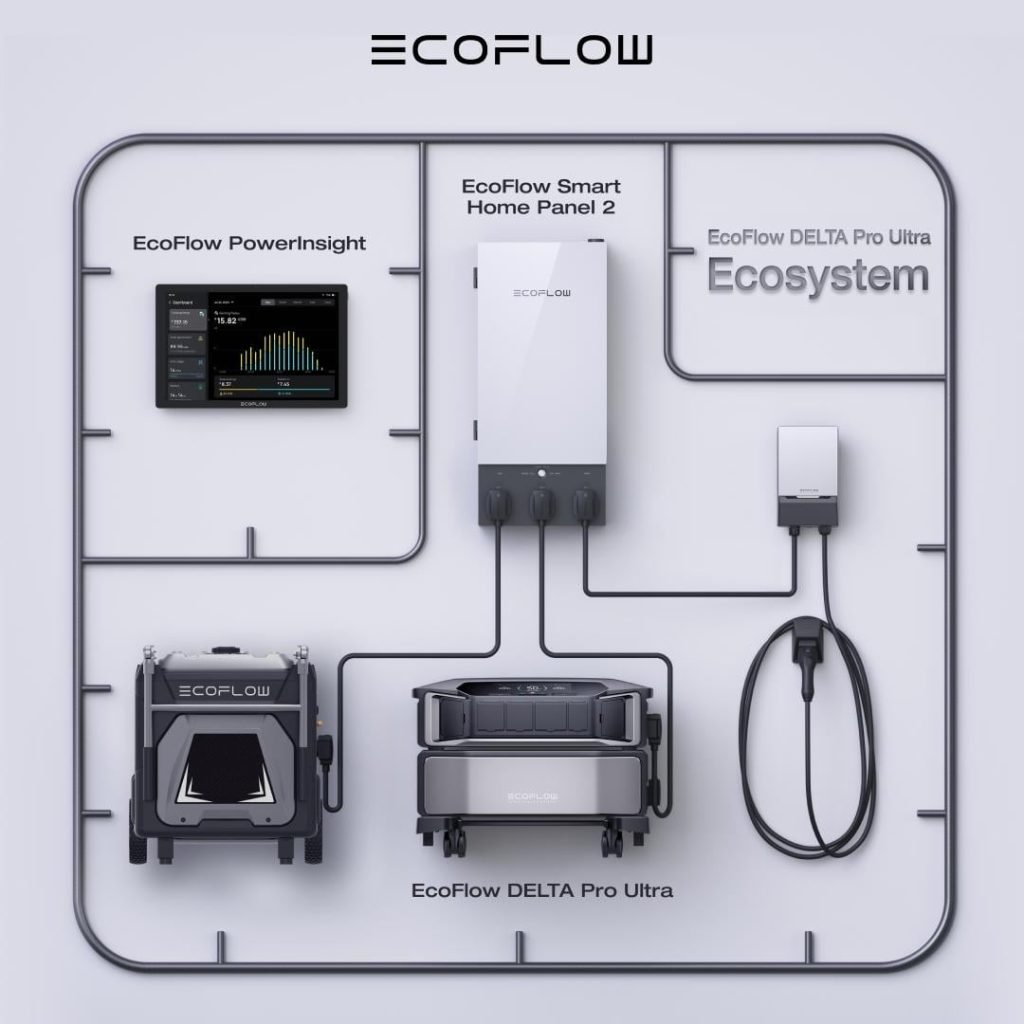
Link the other end of the cable to the smart home panel. Make sure the connection is tight to avoid loose contact. The panel controls power flow to your home.
- Double-check all cable connections.
- Secure cables to avoid tripping or damage.
- Turn on the generator and the panel.
- Test if power flows to essential home devices.
Safety Precautions
Avoid electrical hazardsby keeping cables dry and intact. Check cables for cuts or damage before use. Do not overload outlets or extension cords. Use cables rated for your generator’s power output. Always turn off the generator before connecting or disconnecting cables.
Proper grounding prevents shocks and fires. Use a grounding rod driven into the earth near the generator. Connect the generator’s grounding terminal to this rod with a copper wire. Make sure all connections are tight and secure. This helps electricity flow safely into the ground.
| Grounding Step | Description |
|---|---|
| Drive Ground Rod | Insert a copper or galvanized rod at least 8 feet deep into the soil |
| Connect Wire | Attach a copper grounding wire from the generator to the rod |
| Secure Connections | Use clamps to ensure tight, corrosion-free connections |
Troubleshooting Common Issues
Power supply issuescan cause your generator not to work with your smart home. Check if the generator has enough fuel and is turned on. Make sure the circuit breakers are not tripped. Verify the voltage output matches your smart home’s needs. Low or unstable voltage can cause problems.
Cable connection failuresoften happen due to loose or damaged wires. Confirm all cables are tightly connected to both the generator and the smart home system. Look for cuts or frayed wires that might block the power flow. Replace any damaged cables immediately. Use cables with proper ratings for safety and performance.
- Check fuel and power switches.
- Inspect circuit breakers and fuses.
- Verify voltage output with a meter.
- Ensure all cable connections are tight.
- Look for visible cable damage.
- Use cables rated for your generator’s power.
Maintaining Your Generator Setup
Regularly check the cablesfor any signs of damage. Look for cracks, frays, or worn spots. Damaged cables can cause power failureor short circuits. Keep cables clean and dry to prevent rustor corrosion.
Replace cables that show any damage immediately. Use cables that match the generator’s voltage and power rating. Avoid using cables that are too thin or too long, as they can cause voltage drops.
- Check cable connectors for tightness and corrosion.
- Store cables properly to avoid tangling and damage.
- Use cable covers or conduits for protection.
Regular inspection helps keep your generator safe and reliable.

Credit: www.renogy.com
Frequently Asked Questions
How Do I Safely Connect A Generator To My Smart Home?
Use the right cables and a transfer switch to connect safely. Turn off the main power before starting. Follow manufacturer instructions to prevent damage and ensure safety.
What Cables Are Needed For Generator To Smart Home Connection?
Use heavy-duty, outdoor-rated extension cords or generator power inlet cables. Ensure cables have proper gauge to handle your generator’s wattage safely.
Can I Connect A Generator Directly To Smart Home Devices?
No, connect the generator to your home’s electrical panel first. This avoids damage and ensures safe, reliable power distribution to smart devices.
How To Avoid Electrical Hazards When Connecting A Generator?
Always use a transfer switch and proper cables. Keep cables dry and away from foot traffic. Never backfeed power to avoid shock or fire risks.
Conclusion
Connecting your generator to a smart home using cables is simple and safe. Use the right cables and follow the steps carefully. Check all connections to avoid any problems. This setup helps keep power flowing during outages. It also lets you control your home easily.
Always remember to turn off devices before starting. Stay safe and enjoy the benefits of a smart, powered home.