Are you struggling to get valuable performance insights from your standby database? Generating an AWR (Automatic Workload Repository) report in a standby environment can feel tricky, but it doesn’t have to be.
This report holds the key to understanding how your standby database is performing, helping you spot issues before they affect your system. In this guide, you’ll discover simple, step-by-step instructions to create an AWR report in your standby database quickly and accurately.
Stick with me, and you’ll gain a powerful tool to keep your database running smoothly and efficiently. Let’s get started!
Prerequisites For Awr Report
Check the database roleto confirm it is set as standby. This ensures the AWR report collects data from the correct environment.
Verify licensing requirementsare met for generating AWR reports on the standby database. Without proper licenses, report generation may not be allowed.
Ensure you have the necessary privilegesto access AWR data. Typically, the user needs SELECTaccess to performance views and execution rights on AWR procedures.
Credit: hemantoracledba.blogspot.com
Configuring Standby Database
Setting up a snapshot standbyallows you to create a temporary read-write copy of your standby database. This is useful for testing or reporting without affecting the primary database. It helps keep the standby in sync while allowing changes to be made and discarded later.
To enable Automatic Workload Repository (AWR)on the standby, adjust the database parameters to collect performance data. This helps capture workload statistics even on the standby database. Make sure the AWR retention is set properly to avoid losing data.
Synchronization with the primary database is key. Use Data Guardor other replication methods to keep both databases consistent. Regularly check the log apply statusto ensure the standby reflects the primary’s changes accurately.
Generating Awr Report On Standby
Generating an AWR reporton a standby database helps monitor performance. Use SQLPlus commandsto connect to the standby database. Run the script awrrpt.sqlto create the report. It prompts for input like snapshot IDs and report type.
Oracle Enterprise Manager allows easy generation of AWR reports. Navigate to the standby database performance page. Select the desired snapshot range. Click to generate and download the report in HTML or text format.
Running scripts manually also works. Copy the awrrpt.sqlscript to the standby server. Connect with proper credentials via SQLPlus. Input snapshot IDs and output format to create the report. Save the output file for review.
Interpreting Awr Data In Standby
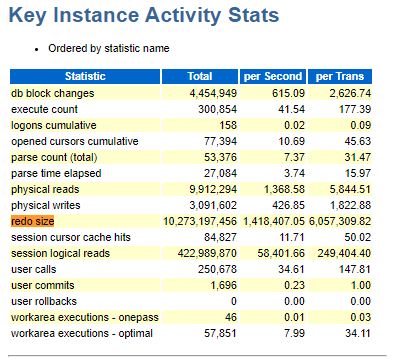
AWR reportsin a standby database show key performance metrics. These include CPU usage, wait events, and I/O statistics. Comparing these with the primary database helps spot differences in workload and system behavior.
Performance metricslike buffer cache hit ratio and redo apply rate indicate how well the standby is keeping up. Monitoring wait eventshelps find delays in processing or resource contention.
Comparing the AWR data side by side reveals gaps in performance. For example, a higher redo apply lag in standby could signal a bottleneck. Look for large differences in CPU or I/O times to find issues.
- Check for high wait times on redo apply or log transport
- Spot heavy CPU use that may slow recovery
- Identify slow disk I/O affecting data sync
- Note differences in session counts or SQL execution
Identifying these bottlenecks helps improve standby database performance. Fixing slow redo apply or tuning resource usage can reduce lag and improve availability.
Common Issues And Fixes
Report generation errorsoften occur due to missing or corrupted AWR data. Check if the snapshot intervalis set correctly. Restart the reporting tool to clear temporary glitches. Make sure the DBMS_WORKLOAD_REPOSITORYpackage is enabled and accessible.
Data synchronization problemshappen when the standby database lags behind the primary. Verify that log shippingis working properly. Use v$dataguard_statsto check lag times. Resynchronize if the delay exceeds acceptable limits.
| Issue | Possible Fix |
|---|---|
| Report Generation Errors | Verify snapshot settings and restart the tool |
| Data Synchronization Problems | Check log shipping and resynchronize if needed |
| Permission and Access Troubleshooting | Grant necessary roles like SELECT_CATALOG_ROLE |
- Ensure the user has proper privileges.
- Grant roles such as
SELECT_CATALOG_ROLEandEXECUTE_CATALOG_ROLE. - Verify network connectivitybetween primary and standby.
- Check listener status and correct any access restrictions.

Credit: hemantoracledba.blogspot.com
Best Practices For Awr In Standby
Scheduling regular AWR reportshelps track database performance over time. Set reports to run at times with low system use. This reduces impact on the standby database. Use automated jobs to create reports weekly or monthly. This keeps performance data fresh and useful.
Maintaining repository sizeis important to avoid storage issues. Archive old AWR reports to save space. Delete reports that are no longer needed. Monitor repository size often to prevent it from growing too large. This helps keep the database fast and stable.
Securing report accessprotects sensitive data in AWR reports. Limit access only to authorized users. Use strong passwords and roles to control who can see reports. Encrypt reports when stored or sent. This keeps performance data safe from misuse.

Credit: www.s-squaresystems.com
Frequently Asked Questions
How Do I Enable Awr On A Standby Database?
AWR is enabled by default in Oracle databases. On a standby, set STATISTICS_LEVEL to TYPICAL or ALL. This allows performance data collection needed for AWR reports.
Can I Generate An Awr Report Directly On Standby?
Yes, you can generate AWR reports on a physical standby using snapshots. Use the DBMS_WORKLOAD_REPOSITORY package with the standby’s snapshot data.
What Is The Difference Between Awr On Primary And Standby?
AWR on primary captures active workload data. On standby, it reports redo apply performance. This helps monitor replication efficiency and potential bottlenecks.
How Often Should Awr Snapshots Be Taken In Standby?
The default snapshot interval is one hour. Adjust frequency based on workload and monitoring needs. More frequent snapshots provide detailed insights but increase overhead.
Conclusion
Generating AWR reports in a standby database is straightforward. Follow the steps carefully. Ensure your database is in the correct mode. Check all settings before you begin. Use the right commands for the report. This process helps monitor database performance.
It aids in identifying potential issues early. Regular reports keep your database healthy. Remember, practice makes perfect. Familiarize yourself with the commands. It will get easier over time. Keep learning and stay consistent. Your database will run smoothly.