Imagine this: a storm hits, the power goes out, and you’re left in the dark. But wait, your trusty generator is ready to save the day.
To make sure it runs smoothly and efficiently, you need to know how to install a generator wireless sensor kit. This little gadget can be a game-changer, offering you real-time insights and control at your fingertips. Do you want to avoid the hassle of running outside in bad weather to check on your generator?
With this guide, you’ll learn the step-by-step process to set it up easily, ensuring peace of mind during those unexpected outages. Keep reading, and discover how to stay connected and in control, even when the lights go out.
Choosing The Right Sensor Kit
Wireless sensor kits come in different types. Some monitor temperature, others track fuel levelsor engine status. Choose a kit that fits your generator’s needs.
Check if the sensor kit is compatiblewith your generator model. Look for matching voltageand connection type. Compatibility ensures easy installationand accurate data.
Important features to consider include:
- Long battery lifefor less maintenance
- Strong wireless rangeto cover distance
- Water resistancefor outdoor use
- User-friendly appfor real-time monitoring
- Alertsfor low fuel or errors
Preparing For Installation
Gathering the right toolsis key before starting. You will need:
- Screwdriver
- Wire cutters
- Electrical tape
- Voltage tester
- Drill (if mounting is needed)
Make sure the generator is completely powered off. This prevents accidents or shocks.
Reading the manufacturer’s manualis important. It has specific instructions and safety tips. Follow these carefully to avoid mistakes.
Mounting The Sensors
Choose sensor locationsthat are close to the generator. Keep sensors away from metal objects. Metal can block wireless signals. Find spots with clear line of sight to the receiver.
Attach sensors securelyusing screws or strong tape. Make sure sensors do not move or fall off. Secure mounting helps sensors work well and last longer.
Avoid interference zoneslike areas near large electrical devices. These devices can cause signal problems. Stay clear of thick walls or metal gates. These can block signals too.

Credit: runlesswire.com
Connecting The Wireless Module
First, power on the wireless module. Press the pairing button until the LED blinks. This means the module is ready to connect.
Next, activate each sensor one by one. Hold the sensor near the module. The LED will stop blinking once paired. Repeat for all sensors.
Access the module’s network menu through its app or web interface. Enter your Wi-Fi name and password carefully. Save the settings to connect the module to your network.
| Signal Level | Description | Action |
|---|---|---|
| Strong (3 bars) | Good connection | No changes needed |
| Medium (2 bars) | Stable but may drop | Move module closer to router |
| Weak (1 bar or less) | Unstable or no connection | Reposition module or use extender |
Powering And Testing The System
First, connect the generator to a power source and switch it on. Make sure the wireless sensors have fresh batteries installed. The sensors will start sending data automatically once powered.
Check the sensor signals on the monitoring device or app. Look for clear, consistent data readings. This confirms the sensors are communicating well with the generator system.
| Common Issue | Possible Cause | Solution |
|---|---|---|
| No sensor signal | Dead batteries or out of range | Replace batteries or move sensor closer |
| Data delay | Weak wireless connection | Check for interference or reposition devices |
| Generator not powering | Power source issue | Verify power supply and connections |

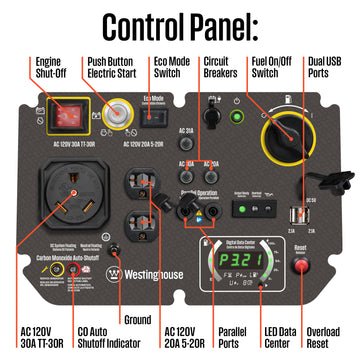
Credit: westinghouseoutdoorpower.com
Maintaining Your Sensor Kit
Check the batteries regularlyto keep your sensor kit working well. Replace batteries before they run out to avoid interruptions. Use fresh batteries recommended by the manufacturer for best results.
Keep the sensor kit’s firmware updated. Updates fix bugs and add new features. Connect the sensor to your computer or app to download the latest version easily.
Clean the sensors gently with a soft cloth. Avoid using water or strong chemicals. Look for dust or damage on the sensors and mounting parts. Clean and inspect every few months to maintain accuracy.

Credit: westinghouseoutdoorpower.com
Frequently Asked Questions
What Tools Are Needed For Installing A Generator Wireless Sensor Kit?
You need a screwdriver, drill, mounting brackets, and batteries. Also, have the sensor kit manual ready for specific instructions. These tools ensure proper sensor placement and secure installation for accurate monitoring.
How Do I Connect The Wireless Sensor To The Generator?
Turn on the sensor and generator. Follow the kit’s pairing instructions to sync devices. Ensure they are within range for stable communication and real-time data transmission.
Where Should I Place The Wireless Sensor On The Generator?
Place the sensor on a clean, dry, and vibration-free area. Avoid direct exposure to heat or moisture. Proper placement ensures accurate readings and extends the sensor’s lifespan.
How Do I Test If The Wireless Sensor Kit Is Working?
After installation, check the sensor’s LED indicators and app notifications. Perform a manual test by running the generator. Confirm data updates on your monitoring device to ensure functionality.
Conclusion
Installing a generator wireless sensor kit improves safety and convenience. Follow each step carefully for best results. Test the sensors to ensure they work well. Keep the kit clean and check batteries often. This simple setup helps monitor your generator easily.
Stay prepared and avoid unexpected power issues. A reliable sensor kit protects your equipment and home. Take your time and enjoy the peace of mind.