Are you tired of unexpected power outages during crucial moments? Your lead-acid generator battery might be the unsung hero ensuring your backup power is always ready to kick in.
But, like any hero, it needs proper care to perform at its best. Understanding how to maintain your lead-acid generator battery can make the difference between seamless power and frustrating failures. In this guide, you’ll discover simple yet effective maintenance techniques to keep your battery running smoothly.
Imagine the peace of mind knowing that your power source is reliable and ready whenever you need it. Don’t let a neglected battery leave you in the dark—explore these essential maintenance tips and keep your generator in top condition. Read on to learn how a little attention can go a long way in maximizing your battery’s lifespan and efficiency.
Battery Basics
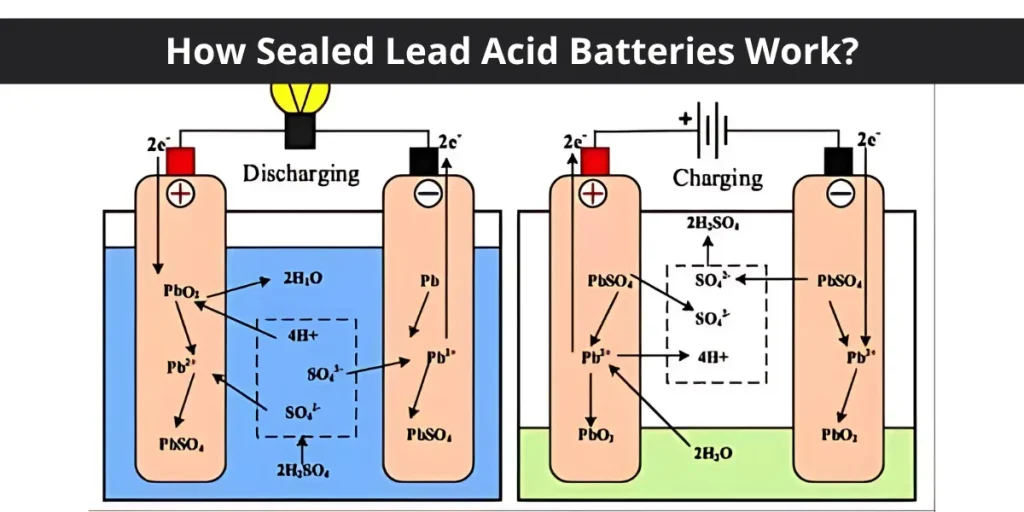
Lead-acid batteriescome in various types. The two common ones are floodedand sealedbatteries. Flooded batteries need regular water checks. Sealed batteries are maintenance-free but cost more. Both types store electrical energy through a chemical reaction between lead plates and sulfuric acid.
Generator batteries work by converting chemical energy into electrical energy. When the generator starts, the battery sends power to the starter motor. This power helps the engine begin running. The battery also supports the generator during power surges. Keeping the battery charged and clean ensures it works well.

Credit: www.tycorunenergy.com
Regular Inspection
Regular checks keep lead-acid generator batteries working well. Look closely for cracks, leaks, or swelling on the battery case. These signs mean damage and need quick action.
Battery terminals must be clean and tight. Dirt or corrosion can stop the battery from charging or working. Use a cloth or brush to clean terminals carefully.
- Check terminals for white or green powdery buildup
- Wipe terminals gently with a clean cloth
- Tighten loose terminal connections using a wrench
- Avoid spilling acid during cleaning
Regular visual checks and cleaning help batteries last longer. Small problems caught early save time and money.
Cleaning And Maintenance
Corrosionappears as white or blue powder on battery terminals. It blocks power flow and damages the battery. Use a mixture of baking soda and waterto clean it. Apply the mix with a brush and scrub gently. Rinse with clean water and dry with a cloth. Wear gloves and avoid touching acid.
Keep the battery surface clean to prevent dirt buildup. Use a damp cloth to wipe dust and dirt away. Avoid letting moisture enter battery cells. Check for cracks or leaks regularly. A clean battery lasts longer and works better.

Credit: www.tycorunenergy.com
Proper Charging
Proper charging is key to keep lead-acid generator batteries healthy. Use the right charger that matches the battery voltage. Always charge in a well-ventilated area to avoid gas build-up. Check the battery voltage often during charging to prevent damage.
Overcharging can cause the battery to overheat and lose its lifespan. Use a charger with an automatic shutoff feature to stop charging once full. Avoid leaving batteries connected to the charger for too long. This prevents excess heat and acid loss.
- Use a charger with correct voltage and current.
- Monitor voltage regularly during charging.
- Charge in a cool, ventilated space.
- Use automatic chargers to prevent overcharging.
- Disconnect charger after full charge.
Electrolyte Care
Check the electrolyte levelin each battery cell regularly. It should cover the plates but not overflow. Use a transparent container or a flashlight to see inside clearly. Low levels can cause battery damage.
Top up the battery with distilled wateronly. Tap water contains minerals that harm the battery. Fill just enough to cover the plates. Avoid overfilling to prevent spillage during charging.
- Wear gloves and eye protection when handling electrolyte.
- Remove caps gently to avoid damage.
- Keep the battery clean and dry after topping up.

Credit: www.tycorunenergy.com
Storage Tips
Store batteriesin a cool, dry place away from direct sunlight. Keep them on a flat surface and avoid placing heavy objects on top. Ensure good ventilation to prevent gas build-up. Avoid areas with high humidity to stop corrosion.
Keep batteries clean and dry. Wipe off dirt and moisture regularly. Check terminals for rust and clean with a wire brush if needed.
- Maintain charge by checking battery voltage monthly.
- Use a trickle chargeror smart charger to keep batteries charged.
- Do not let the battery voltage drop below 12.4 volts.
- Disconnect the battery if storing for a long time to reduce self-discharge.
Troubleshooting Common Issues
Identifying battery problemshelps avoid sudden failure. Look for signs like low voltage, swollen battery case, or leaking acid. A battery that won’t hold a chargeor takes too long to chargemay be faulty. Strange smells or corrosion on terminals also indicate trouble. Use a multimeter to check voltage regularly. Clean terminals with a baking soda solution if corroded.
When to replace the batterydepends on its condition and age. Most lead-acid batteries last about 3 to 5 years. Replace if the battery shows cracks, swelling, or cannot hold chargeafter full recharge attempts. Also, if the battery voltage stays below 12 voltsunder load, replacement is needed. Keeping an old, weak battery can damage your generator system.
Frequently Asked Questions
How Often Should I Check My Lead-acid Generator Battery?
You should check your lead-acid generator battery monthly. Regular checks help spot corrosion, fluid levels, and charge status. This maintenance prevents unexpected failures and extends battery life. Always inspect terminals and electrolyte levels carefully for optimal performance.
What Is The Best Way To Clean Battery Terminals?
Use a mixture of baking soda and water to clean terminals. Apply the solution with a brush to remove corrosion. Rinse with water and dry thoroughly. Clean terminals ensure good electrical contact and prevent power loss.
How Do I Maintain Proper Electrolyte Levels?
Check electrolyte levels monthly and top up with distilled water if needed. Avoid overfilling as it may cause acid spills. Maintaining correct levels ensures efficient battery charging and longer life.
Can Temperature Affect Lead-acid Battery Life?
Yes, extreme temperatures reduce battery life and performance. High heat speeds up corrosion, while cold slows chemical reactions. Store batteries in a cool, dry place to maximize lifespan.
Conclusion
Maintaining your lead-acid generator battery extends its life and saves money. Check water levels often and keep terminals clean. Charge the battery regularly to avoid damage. Store batteries in a cool, dry place. Simple care prevents sudden failures and power loss.
Small efforts lead to reliable backup power. Stay consistent with these easy steps. Your generator will serve you better and longer. Take care today for peace of mind tomorrow.