Are you struggling with a generator remote control that just won’t cooperate? You’re not alone.
Many people face issues when their generator’s remote control stops working or becomes unresponsive. It can be frustrating, especially when you need power the most. But don’t worry—resetting your generator remote control can be simpler than you think. In this guide, you’ll discover step-by-step instructions that are easy to follow, even if you’re not a tech expert.
Imagine the relief of having your generator back in action, ready to power up your home or business whenever you need it. Stay with us, and you’ll soon have the confidence to tackle this task with ease.

Credit: www.rvmp.co
Common Reasons To Reset
Signal interferencecan cause your generator remote to stop working properly. Other devices nearby may block the signal. Moving the remote or turning off other electronics might help.
Battery issuesare common. Weak or dead batteries often cause connection problems. Check the batteries and replace them if needed to restore remote control function.
Software glitchesmay affect the remote’s performance. Sometimes, the remote needs a reset to clear errors. Resetting can solve many small software problems.
Preparation Steps
Gathering the right toolsis key for resetting the generator remote control. Common items include:
- Small screwdriver
- New batteries
- Owner’s manual
- Soft cloth
Each tool helps in different parts of the reset process. Keeping them ready saves time and frustration.
Safety must come first. Always turn off the generator and unplug it before starting. Avoid working near wet areas or fuel sources. Use gloves if possible to protect your hands.
Read the manual to understand any model-specific warnings. Careful handling avoids damage and keeps you safe.
Resetting The Remote Control
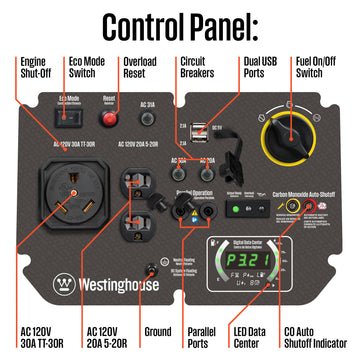
Resetting the remote control can fix connection problems. Start by locating the reset buttonon the remote or the generator unit. Press and hold this button for about 10 seconds. This will clear previous settings.
Next, remove the remote’s battery for a few seconds. Put the battery back in and turn the remote on. This can help refresh the remote’s memory.
- Press the reset button on the generator if available.
- Hold the button until lights blink or a sound is heard.
- Release the button and wait for the system to reset.
To reprogram the remote, follow these quick steps:
- Press and hold the program buttonon the generator.
- While holding, press any button on the remote.
- Release both buttons after a beep or light signal.
- Test the remote to see if it works with the generator.

Credit: www.championpowerequipment.com
Testing The Remote
Check the remote’s signal rangeby moving closer to the generator. The remote should work within 30 to 50 feet. Walls or metal objects can block the signal.
Press any button and watch for a response from the generator. The generator should start, stop, or show a light signal. If no response occurs, the remote or generator may need resetting.
- Make sure batteries in the remote are fresh and properly placed.
- Test the remote from different distances to find signal limits.
- Try pressing buttons slowly to ensure the signal is sent clearly.
- If the generator does not respond, check if it has a reset button or switch.
Troubleshooting Tips
Replacing batteriesin the remote control often fixes issues. Use fresh batteries of the correct type. Remove the old batteries carefully and insert the new ones in the right direction. Check the battery compartment for dirt or corrosion and clean it if needed.
Resetting the generator unitcan restore normal function. Turn off the generator and unplug it from all devices. Wait for a few minutes to let it cool down. Press and hold the reset button on the unit or follow the manual’s reset instructions. Restart the generator after resetting.
When to contact support:
- Remote control still does not work after replacing batteries.
- Generator reset does not fix the problem.
- Unusual noises or smells come from the generator.
- Generator fails to start or stops unexpectedly.
Contacting support helps avoid damage and ensures safety.
Maintaining Remote Control Performance
Checking the batteries regularlykeeps the remote working well. Replace old batteries to avoid weak signals. Use fresh, good-quality batteries for best results.
Keep the remote dryand safe from dust or dirt. Avoid exposing it to extreme heat or cold. Store it in a clean, dry place to protect from damage.

Credit: a-ipower.com
Frequently Asked Questions
How Do I Reset My Generator Remote Control?
To reset, locate the reset button on the remote or receiver. Press and hold it for 10 seconds. This clears previous settings and allows reprogramming.
Why Is My Generator Remote Control Not Working?
Common issues include dead batteries, signal interference, or incorrect pairing. Check batteries, ensure clear line of sight, and reprogram the remote if needed.
Can I Reset My Generator Remote Control Myself?
Yes, most generator remotes have a simple reset process. Follow the user manual steps carefully to avoid damaging the device.
How To Reprogram A Generator Remote After Reset?
After resetting, enter programming mode by pressing specific buttons on the receiver and remote. Follow the manual for exact button sequences and timing.
Conclusion
Resetting your generator remote control is simple with clear steps. Follow the guide carefully to avoid mistakes. Check the battery and connections first. Press the reset button as shown in the instructions. Test the remote after resetting to ensure it works.
Keep the manual handy for future reference. Regular maintenance helps keep your generator ready. Stay safe and take your time during the process. Now, you can control your generator without trouble.