
Your Generac standby generator is a vital part of your home’s backup power system. But what happens when the time on your generator is off?
It could disrupt the system’s efficiency, leaving you in the dark—literally! Resetting the time might sound complicated, but it’s easier than you think. Imagine having the peace of mind knowing your generator is functioning perfectly, ready to kick in when you need it most.
You’ll feel empowered and in control, and all it takes is a few simple steps. Ready to ensure your generator is always on time? Let’s dive in!
Locate The Control Panel
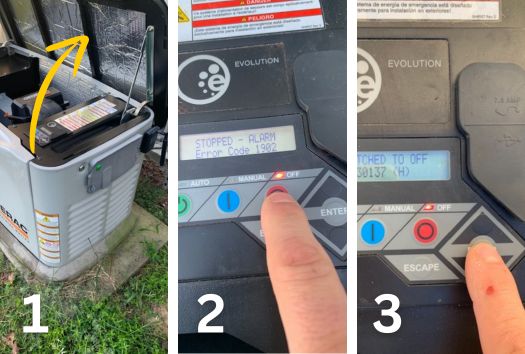
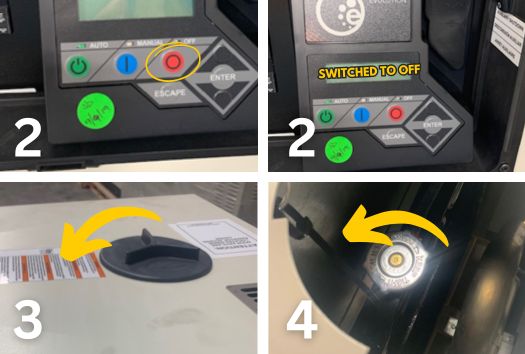
The control panel is usually on the front or side of the generator. It shows a small screen and some buttons. Look for a door or cover that you can open to see the panel. The panel has the settings needed to change the time. It is important to be gentle when opening the panel to avoid damage. The control panel is where you will do all the settings for your generator.
Make sure the generator is not running while you access the control panel. This helps keep you safe and stops errors. The panel might have a light or screen that shows the current time. You can use the buttons near the screen to change the time.
Access The Time Settings
Locate the control panel on your Generac standby generator. It is usually on the front or side. Open the panel door carefully to find the display screen and buttons. The screen shows current settings and time. Use the arrow keys to navigate the menu options. Press the “Menu” or “Settings” button to enter the time settings. Wait for the time setting screen to appear. It may say “Set Time” or “Clock.”
Use the arrow keys to adjust the hour and minute. Confirm each change by pressing the “Enter” or “OK” button. After setting the correct time, exit the menu by pressing the “Back” or “Exit” button. Close the panel door securely. The generator will now operate with the correct time set.
Adjust The Time
Use the up and down buttonson the control panel to change the time.
Press the up buttonto increase the hour or minute.
Press the down buttonto decrease the hour or minute.
Hold the button to move faster through numbers.
Check the AM or PMsetting carefully.
Use the same buttons to toggle between AM and PM.
Make sure the time matches your local time.
This ensures the generator runs on the correct schedule.
Credit: grastengenerators.com
Save The New Time
After setting the new time on your Generac standby generator, press the Saveor Enterbutton. This action ensures the generator remembers the updated time. Without saving, the time will revert to the old settingwhen the unit powers off.
Wait a few seconds to confirm the display shows the correct new time. If the time does not update, repeat the process carefully. Always check the owner’s manualfor exact button names, as they vary by model.
- Press Saveor Enterafter setting time
- Wait until the display confirms the new time
- Repeat if the time does not update
- Consult the manual for button details
Verify The Updated Time
Check the generator’s display to see if the time is correct. The time should match your local time zone and current daylight saving settings.
Use the control panel buttons to adjust the time if needed. Some models show the time on a digital screen.
Verify that the AM and PMsettings are correct. This helps avoid any timing errors for automatic starts or stops.
After setting, watch the display for a few minutes. Make sure the clock runs smoothly and does not reset or freeze.
If the time keeps resetting, the generator’s battery or internal clock may need attention.

Credit: www.generac.com
Troubleshooting Common Issues
The control panelmay stop responding due to power issues or faults. Check the circuit breakerand fuses first. Reset the breaker if tripped. Ensure all wiring connections are tight and free from damage.
Sometimes, the panel needs a soft reset. Turn off the generator and unplug it. Wait for a minute before turning it back on. This may help clear minor faults and restore panel function.
After a power loss, the time on the generatoroften resets to zero. It is important to reset the clockto keep proper logs and operations.
- Press the menubutton on the control panel.
- Navigate to the time settings.
- Use the arrow keys to set the correct hourand minute.
- Save the changes and exit the menu.
Tips For Maintaining Accurate Time
Regularly checkyour Generac generator’s time settings. A correct time ensures proper scheduling and operation. Keep the generator in a place with stable power to avoid time resets after outages.
Use the control panel to manually adjustthe time if it drifts. Refer to the user manual for detailed steps on your model. Reset time after power interruptions to maintain accuracy.
- Keep firmware updated for better timekeeping.
- Ensure battery backup is charged to save settings.
- Schedule regular maintenance checks.
- Record any time changes for future reference.
Credit: grastengenerators.com
Frequently Asked Questions
How Do I Reset The Time On A Generac Standby Generator?
To reset the time, access the control panel, navigate to the clock settings, and use the arrow keys to adjust. Save changes to update the generator’s internal clock accurately. This ensures the generator operates on the correct schedule.
Why Is Resetting The Time Important For Generac Generators?
Resetting the time ensures your generator runs tests and maintenance cycles at the right times. Accurate time helps prevent unexpected outages and maintains optimal performance. It also keeps logs and alerts properly timed for troubleshooting.
Can I Reset The Time Without Professional Help?
Yes, you can reset the time yourself by following the control panel instructions. Most Generac models have user-friendly menus for time adjustment. However, consult the user manual for model-specific steps or call support if unsure.
How Often Should I Check The Generator’s Time Settings?
Check the time settings after power outages, daylight saving changes, or battery replacement. Regularly verifying ensures your generator’s schedule remains accurate and reliable. This simple step helps avoid operational errors.
Conclusion
Resetting the time on your Generac standby generator is quick and simple. Follow the steps carefully to avoid mistakes. Regularly checking the time helps keep your generator running smoothly. It ensures accurate test cycles and proper operation. Taking a few minutes now saves trouble later.
Stay confident in your generator’s performance. Keep power ready when you need it most. Trust the process and keep your equipment updated. Small actions make a big difference in reliability.