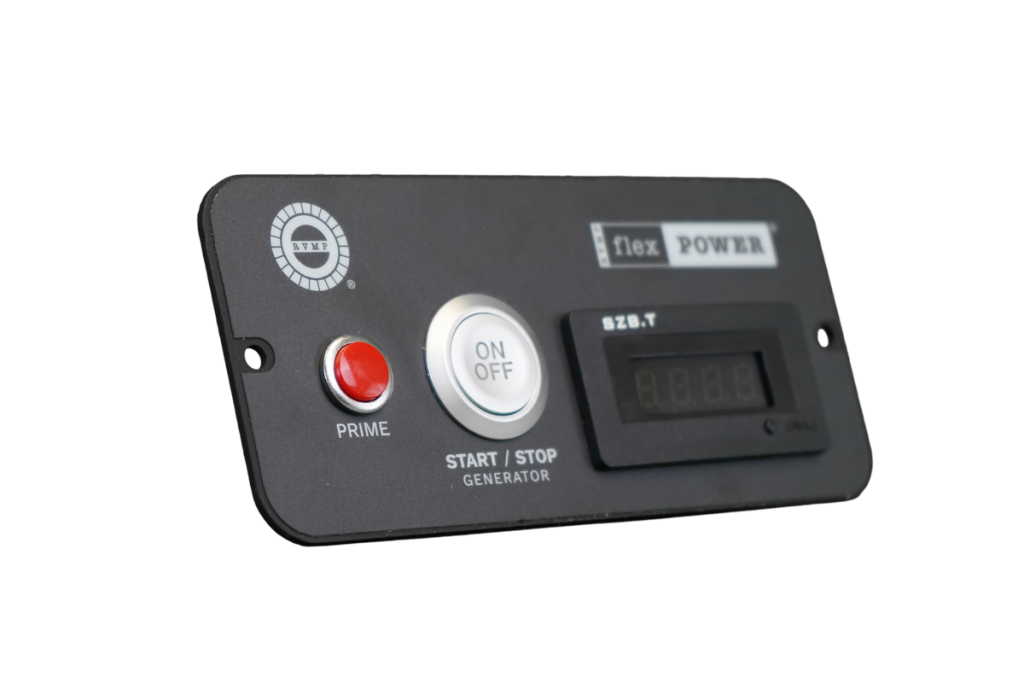
Are you struggling to figure out how to test your generator remote control panel? You’re not alone.
Many people find themselves puzzled when it comes to ensuring their generator is ready to perform at its best when needed. The good news is that testing your generator’s remote control panel doesn’t have to be complicated. In fact, with a little guidance, you can confidently take on the task yourself.
Imagine the peace of mind you’ll have knowing your generator is fully functional and ready to kick in during a power outage. No more worrying about unexpected failures or scrambling in the dark. By the end of this article, you’ll have the step-by-step knowledge needed to efficiently test your generator’s remote control panel. Get ready to empower yourself with the skills to keep your home or business safe and powered up. Dive in, and let’s get started on making sure your generator is always ready when you need it most.
Preparing For The Test
Gather all necessary toolsbefore starting the test. These include a multimeter, screwdrivers, and the generator manual. Keep a notebookhandy for notes.
Always check for safety measures. Wear glovesand safety glasses. Make sure the generator is offand disconnectedfrom any power source before testing.
Review the manufacturer guidelinescarefully. Follow the stepsthey provide to avoid damage. Note any warningsor special instructionsto ensure a safe test.

Credit: bernini-design.com
Inspecting The Remote Control Panel
Check the remote control panel for any cracks, dents, or dirt. A clean surface helps the buttons work well. Make sure no parts are loose or broken.
Test the battery by opening the battery compartment. Look for corrosion or leaks. Replace old batteries with fresh ones to keep signals strong.
| Connection Port | What to Check | Action |
|---|---|---|
| USB Port | Clean and free of dust | Use a soft brush to clean gently |
| Power Port | No corrosion or damage | Wipe with a dry cloth and check tightness |
| Signal Cable Port | Secure connection and no bent pins | Reconnect firmly or replace cable if damaged |
Establishing Communication
Establishing communication ensures the remote control panel connects properly to the generator. Check all cables and signals for a clear, stable link before testing functions. Confirm commands from the panel reach the generator without delay or errors.
Pairing Remote With Generator
Start by turning off the generator and remote control. Press and hold the pairing button on the remote. Turn on the generator while holding the button. Wait until the remote and generator signal connect. A light or beep usually confirms pairing. If no signal, repeat the steps carefully.
Testing Signal Range
Move the remote control away from the generator slowly. Check if the remote can still start or stop the generator. Mark the farthest point where the signal works well. Test in different directions to find any weak spots. Keep obstacles like walls or metal objects in mind.
Troubleshooting Connectivity Issues
- Check if batteries in the remote are charged.
- Make sure the generator is on and ready.
- Try resetting both devices by turning them off and on.
- Look for any physical damage on the remote or generator panel.
- Keep the remote and generator close during pairing.

Credit: bernini-design.com
Performing Functional Tests
Test the generator by starting and stopping it using the remote control panel. Check if it powers on smoothly and stops without delay. Ensure the panel shows correct status during each action.
Keep track of how fast the generator responds to commands. Quick response means the system works well. Slow or no response signals a problem that needs fixing.
- Press the emergency stop button on the panel.
- Confirm the generator shuts down immediately.
- Verify alarms or signals activate during shutdown.
- Reset the system and check normal functions return.
Analyzing Test Results
Recording performance datahelps track how the remote control panel works. Note down voltage levels, response times, and error messages. Use a clear format to keep data easy to read. This info shows if the system runs well or needs fixes.
Identifying anomaliesmeans spotting any unusual signs. Look for unexpected delays, wrong readings, or failed commands. These may point to problems in the control panel or wiring. Quick detection stops bigger issues later.
Planning maintenance actionscomes after reviewing test results. Decide if parts require cleaning, repair, or replacement. Set a schedule for routine checks to keep the panel in good shape. Proper care ensures long-lasting and reliable operation.
Maintaining The Remote Control Panel
Keep the remote control panel clean to ensure smooth operation. Use a soft, dry cloth to wipe away dust and dirt gently. Avoid using water or harsh chemicals that may damage the panel. Cleaning regularly prevents buttons from sticking and maintains clear screen visibility.
Check the battery level often. Replace batteries every 6 to 12 months or when the panel shows low power signs. Use the correct battery type to avoid damage. Always dispose of old batteries safely.
Firmware updates improve panel performance and fix bugs. Check the manufacturer’s website or app for the latest versions. Follow instructions carefully during updates to avoid errors. Regular updates keep the remote control panel working well and secure.

Credit: bernini-design.com
Frequently Asked Questions
How Do I Start Testing A Generator Remote Control Panel?
Begin by ensuring the generator and panel are powered off. Connect the panel to the generator. Turn on power and check for system responsiveness and error codes on the display.
What Tools Are Needed To Test The Remote Control Panel?
You will need a multimeter, communication cables, and the generator’s user manual. These tools help verify electrical signals and panel functions accurately.
How Can I Verify Communication Between Panel And Generator?
Check the panel’s display for status updates. Use diagnostic software if available, and ensure the communication cables are securely connected.
What Are Common Issues Found During Panel Testing?
Common issues include no response, incorrect readings, and communication errors. Identifying these early helps prevent generator malfunction during operation.
Conclusion
Testing your generator remote control panel keeps it working well. Follow each step carefully to find any problems fast. Regular checks help avoid unexpected failures during use. Keep the panel clean and buttons responsive for best results. Stay safe by turning off power before testing.
A working remote makes starting and stopping the generator easy. Simple tests can save time and money later. Always review the manual for specific test instructions. Reliable control means peace of mind during power outages. Testing often keeps your generator ready when you need it.