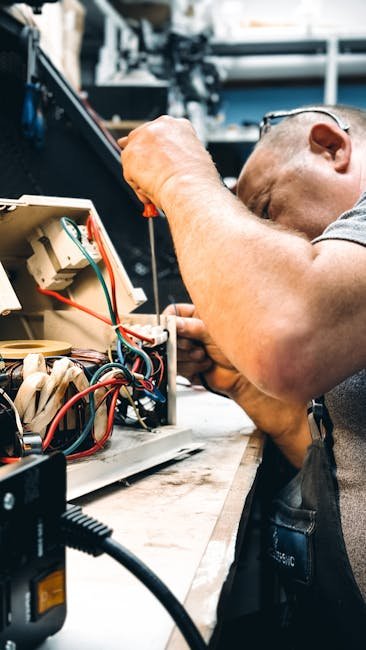
Struggling with generator connector issues can be frustrating, especially when you rely on them for your power needs. You might find yourself in a situation where the power just won’t come on, or perhaps it’s flickering on and off.
It’s not just an inconvenience; it can be a real problem if you’re unprepared. But don’t worry; you’re not alone, and there are solutions within your reach. Imagine the relief of having your generator running smoothly again, providing you with the power you need without any hiccups.
In this guide, we’ll walk you through simple, effective steps to troubleshoot these pesky connector issues. Get ready to discover how easy it can be to get your generator back on track, ensuring your peace of mind and uninterrupted power supply. Stay tuned—you won’t want to miss these essential tips!
Credit: www.fix.com
Common Generator Connector Problems
Loose connectionscan cause power loss or flickering. Check if wires or plugs feel wobbly. Tighten any loose screws or nuts.
Corroded terminalsblock electricity flow. Clean them using a wire brush or sandpaper. Apply a protective spray to stop future rust.
Damaged wiresmay have cuts or cracks. Replace any worn or broken cables to avoid short circuits or shocks.
Faulty plugs and socketscan cause sparks or fail to connect. Inspect for broken pins or melted plastic. Swap out damaged parts for safety.
Tools Needed For Troubleshooting
Essential tools help fix generator connector problems fast. A multimeterchecks voltage, current, and resistance. It finds faulty wires or connections quickly.
Screwdrivers and pliersallow easy access to screws and hold small parts firmly. These tools help open panels and tighten loose connectors.
Wire strippersremove insulation from wires safely. They prepare wires for new connections or repairs without damage.
Contact cleanerremoves dirt and corrosion from electrical contacts. It improves connection quality and prevents future issues.
Step-by-step Troubleshooting Process
Check the generator connector for any visible damage. Look for cracks, broken pins, or melted plastic. Ensure the connector fits tightly and does not wobble. Any damage or looseness can cause power problems.
Use a multimeter to test electrical continuity. Touch the probes to each end of the wire or pin. A beep or zero reading means the connection is good. No sound or infinite reading shows a break inside.
Remove any rust or dirt from the connector pins. Use a wire brush or sandpaper gently. Clean surfaces help electricity flow better and prevent overheating. Avoid using water or liquids that can cause short circuits.
- Tighten any loose screws or clamps holding the wires.
- Push the pins back into place if they are bent.
- Make sure the wires are secure and not moving freely.
If parts are broken or badly corroded, replace them. Use exact matches for pins, wires, and plastic covers. Faulty components can cause sparks or stop the generator from working.

Credit: www.threads.com
Safety Tips During Repairs
Always turn off powerbefore starting any repair work. This stops electric shocksand injuries.
Use only insulated tools. These tools protect you from electric current.
Wear protective gearlike gloves and safety glasses. It keeps you safe from sparks and sharp parts.
Avoid wet conditionswhile working. Water and electricity can cause serious harm.
Preventive Maintenance For Connectors
Regular inspections catch loose connectionsearly. Check for corrosionand worn parts. Use a flashlight to spot hidden damage. Look for signs of heator burn marks.
Cleaning connectors often stops dirtbuild-up. Use a soft brush and contact cleaner. Avoid water to prevent rust. Keep a cleaning scheduleto stay consistent.
Proper storage protects connectors from moistureand dirt. Store in a dry, cool place. Avoid stacking heavy items on them. Use sealed containersif possible.
Using protective covers keeps connectors safe during transportand storage. Covers block dust and water. Choose covers that fit snugly and are durable.
When To Call A Professional
Complex electrical issues with generator connectors can be risky to fix. Professionals have the right tools and knowledge to handle these problems safely. Persistent faults that do not clear after simple troubleshooting may indicate deeper electrical or mechanical problems. These often require expert diagnosis to avoid further damage.
Considering warranty terms is important. Trying to fix connector issues without expert help might void the warranty. This can lead to costly repairs later. Safety concerns should always come first. Incorrect handling of electrical parts can cause shocks, fires, or damage to the generator.
- Complex wiring problems need expert attention.
- Persistent faults suggest serious underlying issues.
- Professional repairs protect your warranty rights.
- Safety risks increase with DIY electrical fixes.
Credit: www.premium-electric.ca
Frequently Asked Questions
What Causes Generator Connector Issues?
Generator connector issues often stem from loose connections, corrosion, or damaged wires. Environmental factors like moisture and dirt can also cause faults. Regular inspection and cleaning help prevent most problems and ensure stable power transfer.
How To Identify A Faulty Generator Connector?
Signs include intermittent power loss, sparking, burning smell, or visible damage. Use a multimeter to test connectivity and voltage. Immediate repair or replacement is crucial to avoid further electrical hazards or generator failure.
Can I Fix Generator Connector Issues Myself?
Basic issues like cleaning corrosion or tightening connections can be DIY tasks. However, complex wiring or damaged connectors require professional help to ensure safety and proper function. Always disconnect power before inspecting or repairing.
How Often Should Generator Connectors Be Inspected?
Inspect connectors at least twice a year, especially before heavy use seasons. Frequent checks help catch wear, corrosion, or loose fittings early, preventing breakdowns and costly repairs. Regular maintenance extends the generator’s lifespan.
Conclusion
Troubleshooting generator connector issues does not have to be hard. Start by checking the connectors for dirt or damage. Tighten any loose connections carefully. Use a multimeter to test for electrical problems. Remember, safety comes first—always turn off power before inspecting.
Small steps can save time and money. Keep your generator ready for use by regular checks. Fixing connector problems helps your generator work smoothly. Stay calm and follow simple steps to solve issues fast.