Are you frustrated with your generator’s sensor reading errors? You’re not alone.
These issues can be both confusing and daunting, especially when they disrupt your daily operations or emergency power needs. But before you throw in the towel, know that troubleshooting these errors is easier than it seems. In this guide, you’ll discover step-by-step solutions to tackle those pesky sensor problems.
Imagine the peace of mind you’ll gain by understanding and fixing these issues yourself. So, why wait? Dive into this article and empower yourself with the knowledge to keep your generator running smoothly, all while saving time and money.
Common Sensor Errors
Generators use sensors to check things like temperature, pressure, and fuel level. Common sensor faultsinclude broken wires, dirt on the sensor, or worn-out parts. These faults can cause wrong readings or no readings at all.
Reading inaccuracieshappen for many reasons. Dirt or oil can cover the sensor, causing false signals. Loose connections or damaged cables also affect readings. Sometimes, sensors wear out over time and give bad data.
- Sensor damage from heat or moisture
- Corroded or loose wiring
- Incorrect sensor placement
- Software glitches in the control panel
- Old or outdated sensor models

Credit: www.youtube.com
Diagnosing Sensor Issues
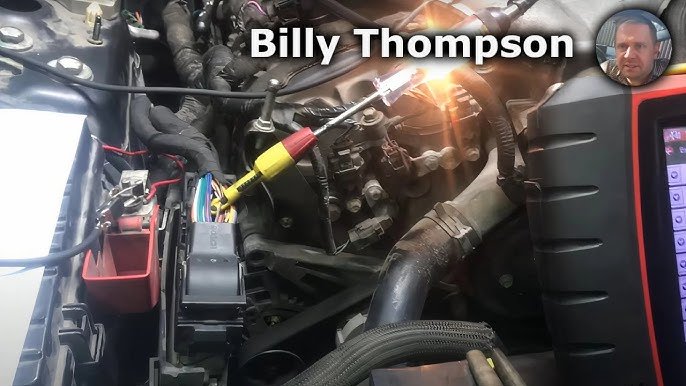
Start by checking the sensor for any visible damage. Look for cracks, dirt, or loose wires. A clean sensor often works better. Make sure all connections are tight and free from rust or corrosion. Sometimes, just cleaning the sensor can fix errors.
Use a multimeter or a diagnostic scanner to read sensor outputs. These tools help check if the sensor sends the right signals. Compare the readings with the generator’s manual values. Faulty sensors usually show unusual numbers or no reading at all.
| Sensor Data | Normal Range | Possible Issue |
|---|---|---|
| Voltage | 12-14 V | Low voltage means poor connection |
| Temperature | 20-80 °C | High temp signals overheating |
| Pressure | 30-50 PSI | Low pressure may indicate leaks |
Fixing Sensor Connection Problems
Check all wiring and connectors for any signs of damage or wear. Loose or corroded contacts often cause sensor reading errors.
Look carefully for wires that are disconnected or frayed. Corrosion can appear as green or white buildup on metal parts.
- Ensure connectors fit tightly without wiggle.
- Clean corroded contacts gently with a wire brush or sandpaper.
- Replace any broken or damaged wires immediately.
- Use dielectric grease to prevent future corrosion.
Secure all connections firmly to avoid future sensor errors.
Credit: canongenset.com
Calibrating Generator Sensors
Calibration is key to fixing sensor reading errors in generators. Start by turning off the generator and letting it cool. Use a reference sensor or known standard to compare readings. Adjust the sensor output to match the standard closely. Repeat the process several times for accuracy. Record all readings during calibration for future checks. Always follow the generator’s manual for exact calibration steps.
Tools needed for calibration include:
- Calibration reference sensoror standard
- Multimeterto measure voltage or current
- Screwdriversfor sensor adjustments
- Manufacturer’s manualfor guidance
- Data recording sheetor device
Replacing Faulty Sensors
Faulty sensorscan cause wrong readings in generators. Signs include frequent alarms, erratic data, or no output. These indicate sensor issues that need fixing.
Check the sensor’s physical condition. Look for cracks, corrosion, or loose wires. Use a multimeter to test sensor resistance. If results differ from the manual’s specs, replacement is needed.
Follow these steps for sensor replacement:
- Turn off the generator and disconnect power.
- Locate the faulty sensor and disconnect its wiring.
- Remove the sensor carefully from its mount.
- Install the new sensor in the same position.
- Reconnect wiring securely to the new sensor.
- Turn on the generator and check sensor readings.
- Test the system to confirm the sensor works well.
Preventing Future Sensor Errors
Regular maintenancekeeps sensors working well. Clean sensors often to remove dirt and dust. Check sensor wires for any damage or loose connections. Replace worn parts quickly to avoid errors. Use the right tools for sensor checks to get good results.
Environmental factors can cause sensor reading errors. Keep the generator in a dry, clean placeto stop moisture and dust buildup. Avoid strong vibrations or extreme temperatures near sensors. Protect sensors from harsh chemicalsor heavy dirt. Proper placement helps sensors give accurate readings.

Credit: www.youtube.com
Frequently Asked Questions
What Causes Generator Sensor Reading Errors?
Generator sensor errors often stem from loose connections, damaged wires, or faulty sensors. Environmental factors like moisture or dirt can also interfere. Regular inspection helps identify these issues early, ensuring accurate readings and optimal generator performance.
How To Reset A Faulty Generator Sensor?
To reset a faulty sensor, first turn off the generator. Disconnect the sensor cable, wait a few minutes, then reconnect it. Restart the generator and check if the sensor readings normalize. This simple reset often resolves minor glitches.
Can Software Updates Fix Sensor Reading Problems?
Yes, software updates can resolve sensor errors by fixing bugs or improving compatibility. Always use manufacturer-approved updates and follow instructions carefully. Keeping software current ensures your generator’s sensors operate smoothly and reliably.
How To Test If A Generator Sensor Is Working?
Use a multimeter to check sensor voltage or resistance against specifications. Consult the generator manual for exact values. If readings are outside the normal range, the sensor might be faulty and require replacement.
Conclusion
Troubleshooting generator sensor errors can save time and money. Start by checking sensor connections and wiring. Clean or replace dirty or damaged sensors. Reset the system to clear error codes. Regular maintenance helps prevent future sensor issues. Small steps lead to better generator performance.
Stay patient and follow these tips carefully. Reliable sensor readings keep your generator running smoothly. Keep your equipment in good shape for longer life. Simple fixes often solve common sensor problems fast.