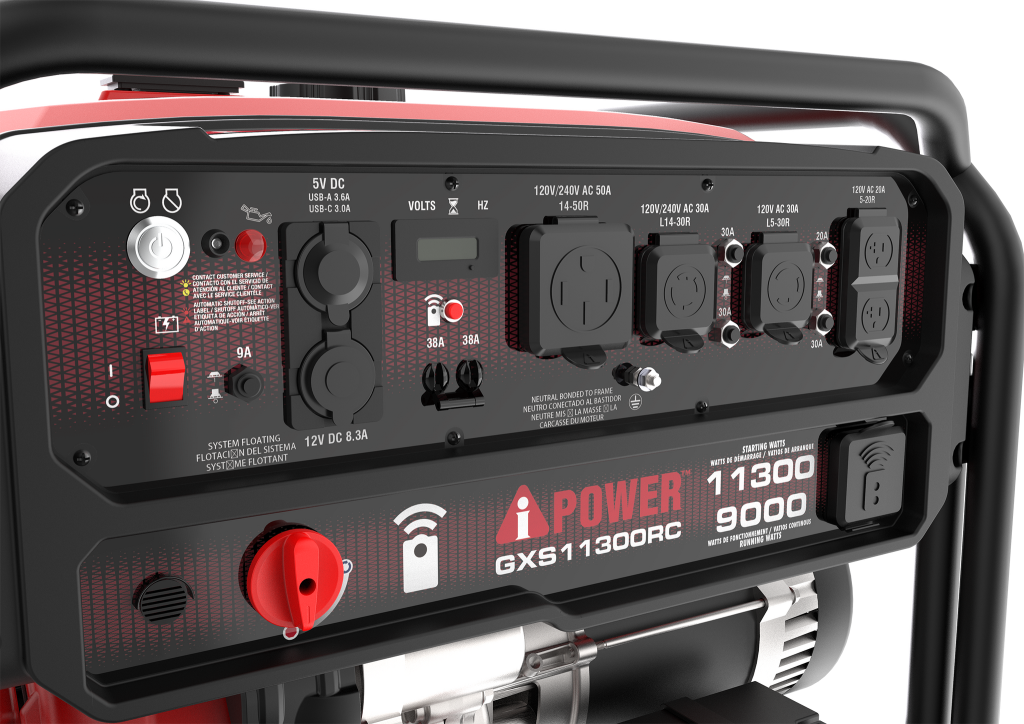
Have you ever wished you could start or stop your generator without leaving your chair? Using a generator remote control makes that possible—and it’s easier than you think.
Imagine the convenience of powering up your generator from a distance, saving time and effort, especially during emergencies or bad weather. In this guide, you’ll discover simple steps to use your generator remote control effectively, ensuring you get the most out of this handy device.
Ready to take control with just a click? Let’s dive in and make your generator work smarter for you.

Credit: a-ipower.com
Benefits Of Remote Control
Remote controloffers great convenience. You can start or stop your generator from far away. This saves time and effort. It also helps keep you safe by avoiding the need to go near the generator during bad weather or dangerous conditions.
Enhanced power managementis another key benefit. Remote control lets you adjust power output easily. This helps prevent overloads and saves fuel. You can also schedule generator use to match your needs, reducing waste.
| Feature | Benefit |
|---|---|
| Remote Monitoring | Check generator status anytime from a phone or computer |
| Alerts | Get notified if there is a problem or maintenance is needed |
| Control Access | Allow only authorized users to operate the generator |
Types Of Generator Remote Controls
Basic On/Off Remoteslet you start or stop the generator from a distance. They are simple and easy to use. These remotes usually have just two buttons: power onand power off. They work with a radio signal and do not show any other information.
Smartphone App Controlsconnect your generator to your phone via Wi-Fi or Bluetooth. You can start, stop, and check the generator’s status from the app. Some apps also send alerts if there is a problem. This makes controlling your generator very convenient.
Advanced Monitoring Systemsoffer detailed info about the generator’s health. They track fuel levels, oil pressure, and engine temperature. These systems can also send real-time alerts to your phone or computer. Perfect for those who want full control and safety.
Setting Up Your Remote Control
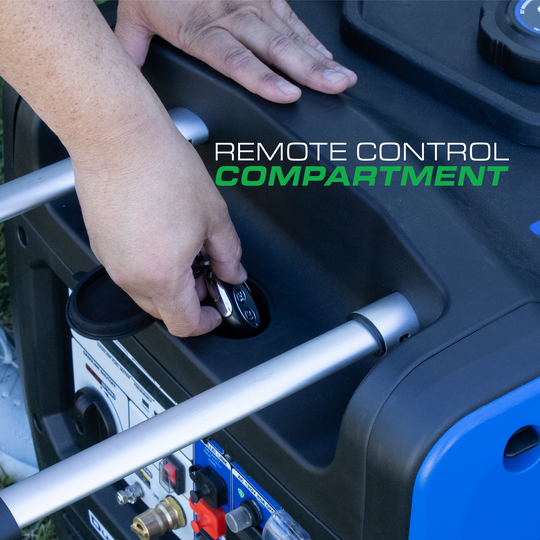
Check if the remote control matches your generator model. Different brands use different signals. Using the wrong remote can cause control issues or damage.
Pairing connects the remote to the generator’s control system. Usually, press a button on the generator and the remote at the same time. Wait for a light or beep to confirm pairing.
- Turn off the generator before installing.
- Attach the control system to the generator’s control panel.
- Connect wires firmly to avoid loose contacts.
- Test the remote to ensure it controls start and stop functions.
Credit: www.duromaxpower.com
Operating The Remote Control
Use the remote control to startand stopthe generator easily. Press the start buttonto power it on. Wait a few moments for the generator to stabilize. To stop, simply press the stop button. The generator will shut down safely.
Adjust the power outputbased on your needs. Use the power level buttonsto increase or decrease output. Keep the output within the generator’s capacity to avoid damage.
- Emergency stop:Use this button for quick shutdown in danger.
- Overload protection:The remote alerts if power load is too high.
- Safety lock:Prevents accidental starting or stopping.
Troubleshooting Common Issues
Connection problemsoften cause remote control failures. Check if the remote’s batteries are fresh and installed correctly. Make sure the remote is within the effective rangeof the generator. Remove any obstacles between the remote and the generator. Try pressing the buttons firmly to ensure good contact.
For battery replacement, use the exact battery type recommended by the manufacturer. Open the battery compartment carefully to avoid damage. Replace old batteries with new ones, paying attention to the polarity (+/-). Dispose of used batteries properly. Test the remote after changing batteries to confirm it works well.
Signal interferencecan block remote control signals. Keep the remote away from devices like microwaves or wireless routers. Avoid using the remote near large metal objects or thick walls. Change the remote’s position or angle to improve signal strength. If problems persist, try moving to a different location.
Maintenance Tips For Remote Controls
Keep the remote control clean and dry. Use a soft cloth to wipe dirt and dust gently. Avoid using water or strong cleaners that may damage the device. Store the remote in a cool, dry place away from sunlight and moisture to protect its buttons and circuits.
Regularly check for software updates to keep the remote working smoothly. Updates can fix bugs and add new features. Follow the instructions from the generator’s manual to update the remote control safely.
Inspect the remote control for any physical damage. Look for cracks, broken buttons, or loose parts. Replace batteries promptly to prevent leaks that can harm the device. Fix or replace the remote if it shows signs of wear to ensure proper operation.
Maximizing Remote Control Efficiency
Using a generator remote control saves time and effort by allowing easy start and stop from a distance. It helps monitor power levels and manage settings without being near the generator. This improves safety and convenience during operation.
Optimizing Signal Range
Keep the remote control close to the generator for a strong signal. Remove any large objects between the remote and generator. Use fresh batteries to ensure the remote works well. Avoid using the remote near other electronics that can cause interference. Test the signal at different distances to find the best range.
Integrating With Home Systems
Connect the generator remote to your home automation system for easy control. Use compatible apps to monitor and start the generator remotely. Set up alerts to know when the generator is running or needs attention. Ensure all devices use the same communication protocol for smooth integration.
Energy-saving Practices
- Turn off the generator when not needed to save fuel.
- Use the remote to start the generator only during power outages.
- Regularly check and maintain the generator for better efficiency.
- Program automatic shutdown after a set time to avoid waste.

Credit: a-ipower.com
Frequently Asked Questions
What Is A Generator Remote Control?
A generator remote control lets you operate your generator from a distance. It simplifies starting, stopping, and monitoring without manual access. This tool adds convenience and improves safety during power outages or maintenance tasks.
How Do I Pair The Remote With My Generator?
To pair, turn on your generator and remote control. Press the pairing button on both devices simultaneously. Follow the manufacturer’s instructions carefully to complete the syncing process. This ensures smooth communication between remote and generator.
Can I Start My Generator Remotely?
Yes, you can start your generator remotely using the remote control. This feature saves time and effort, especially during emergencies. Always ensure your remote has fresh batteries and is within the operational range.
Is Generator Remote Control Safe To Use?
Generator remote controls are safe when used properly. Always keep the remote dry and away from extreme temperatures. Follow safety guidelines to prevent accidental startups and ensure secure handling.
Conclusion
Mastering generator remote control enhances convenience and safety. Easy operation leads to efficient power management. Familiarize yourself with the remote’s functions. Always follow the user manual for guidance. Stay informed about the latest features. Regularly check the remote’s battery. Reliable backup power is essential.
Troubleshooting common issues saves time and stress. Share your knowledge with friends and family. Simplify your life with remote control technology. Enjoy peace of mind knowing you can control your generator effortlessly. Embrace the benefits of modern technology. Keep your power needs under control, anytime, anywhere.