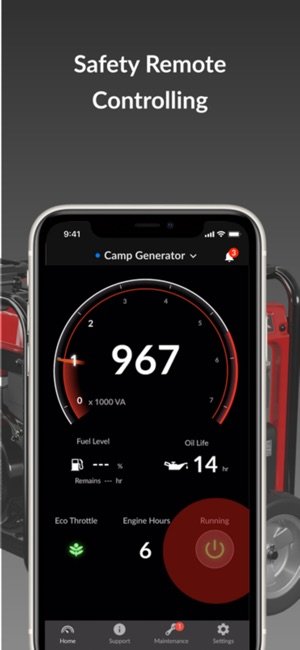
Imagine being able to start your generator from anywhere with just a tap on your phone. No more rushing outside in bad weather or waiting for the power to come back on.
With a generator remote start mobile app, you have full control right at your fingertips. You’ll discover simple steps to set up and use this powerful feature. By the end, you’ll feel confident managing your generator easily and conveniently, saving you time and stress when you need it most.
Keep reading to unlock the full potential of your generator remote start app.
Choosing The Right Generator
Generators with built-in remote startor those that can add a remote start kit work best. Look for models labeled as Wi-Fi or Bluetooth enabled. These connect easily with mobile apps.
Standby and portable generators often support remote start features. Choose one that fits your power needs and app compatibility.
| Feature | Why It Matters |
|---|---|
| App Compatibility | Ensures easy control through your phone. |
| Range | Longer remote start distance adds convenience. |
| Security | Prevents unauthorized use of your generator. |
| Battery Backup | Keeps remote start working during power outages. |

Credit: apps.apple.com
Setting Up Your Generator For Remote Start
First, find the remote start modulefor your generator model. This small device connects to the generator’s control panel. Use the user manualto identify the right spots for wiring. Turn off the generator and unplug it for safety. Attach the module carefully to the control board using the provided wires and connectors. Secure the module so it won’t move or fall.
Next, connect the remote start module to your mobile app. Download the app from the official store. Turn on your phone’s Bluetooth or Wi-Fi as needed. Follow the app instructions to pairthe phone with the module. This process usually takes a few minutes. Once paired, test the connection by sending a start command from the app. The generator should respond quickly, confirming a good link.
Downloading And Installing The Mobile App
The mobile app for your generator remote start works on different platforms. It supports both iOSand Androiddevices. You can download it from the Apple App Storeor Google Play Store. Make sure your device’s operating system is up to date for the best experience.
After installing, the app will ask for some permissions. These include:
- Location accessto connect with your generator.
- Bluetooth or Wi-Fito control the remote start function.
- Notificationsto alert you about your generator’s status.
Enable these permissions in your device’s settings. This helps the app work smoothly and keep you informed.

Credit: apps.apple.com
Pairing Your Generator With The Mobile App
Start by downloading the generator’s mobile app from the app store. Open the app and turn on Bluetooth on your phone. Make sure your generator is powered on and near your phone.
Open the app and follow the prompts to connect to your generator. The app will search for available devices nearby. Select your generator from the list shown. You may need to enter a pairing code found in the generator manual or on the device itself.
After pairing, test the connection by sending a remote start command. The generator should respond immediately. If it does not, check that Bluetooth is enabled and the devices are close enough.
| Troubleshooting Issue | Possible Cause | Solution |
|---|---|---|
| App cannot find generator | Bluetooth off or weak signal | Turn on Bluetooth and move closer |
| Generator not responding | Incorrect pairing code | Check code and re-enter |
| App crashes or freezes | App version outdated | Update app to latest version |
Using Remote Start Features
Using the mobile app, you can start and stopyour generator remotely. This allows you to control the generator without being near it. Simply open the app and press the startor stopbutton. The generator responds quickly, giving you peace of mindand control.
Keep track of your generator’s statusat any time using the app. It shows if the generator is running, stopped, or in standby mode. You can also see fuel levels and any alerts for maintenance. This helps you avoid surprises and maintain your generator better.
- Set schedulesfor automatic start and stop times.
- Receive alertsfor low fuel or errors.
- Customize notifications to stay informed.
Scheduling and alerts make generator use easier and safer. The app helps you plan energy use and avoid downtime.
Ensuring Security And Privacy
Protect your generator by setting strong passwords for the remote start app. Always update the app to fix security issues and keep your connection safe.
App Security Settings
Use a strong password for your mobile app to keep it safe. Enable two-factor authentication if available. This adds an extra layer of protection. Regularly update the app to fix security issues. Avoid using public Wi-Fi when controlling your generator. Always log out after using the app on shared devices.
Protecting Your Generator From Unauthorized Access
- Keep the generator in a secure location.
- Limit app access to trusted users only.
- Set notifications for any app login or generator activity.
- Use a unique username and password for the app.
- Disable remote start when not needed to reduce risk.
Common Problems And Fixes
Connection failuresoften occur due to weak Wi-Fi or mobile data signals. Check your internet connection first. Restarting the router or switching to a stronger network can help. Ensure the app has permission to use mobile data or Wi-Fi. Sometimes, turning airplane mode on and off resets the connection. Keeping the app updated can also fix connection issues.
App crashes and bugsmay happen if the app version is outdated. Clear the app cache to free up space and remove corrupted data. Closing other apps running in the background can improve app performance. Restarting your phone might solve temporary glitches. Report frequent crashes to the app support team for help.
Generator startup issuesmight be caused by weak signals between the app and the generator. Make sure the generator is within the app’s Bluetooth or Wi-Fi range. Check that the generator’s remote start system is powered and working. Try restarting the generator manually, then use the app again. If problems persist, check the generator’s manual for troubleshooting steps.
Tips For Optimizing Remote Start Use
Battery healthis key for remote start reliability. Check battery charge often. Keep terminals clean to avoid power loss. Cold weather can drain battery faster. Store the generator in a dry place to protect the battery.
Keep the app updated. New versions fix bugs and improve performance. Updates can add features that help control the generator better. Set your phone to auto-update the app.
- Run the generator only when needed to save fuel.
- Use the app to schedule start and stop times.
- Check fuel levels before starting remotely.
- Place the generator in a well-ventilated area.

Credit: www.kohlerhomeenergy.rehlko.com
Frequently Asked Questions
How Do I Set Up Generator Remote Start With Mobile App?
Download the app compatible with your generator model. Connect the app to the generator via Wi-Fi or Bluetooth. Follow the in-app instructions to complete the pairing and setup process. Ensure your generator supports remote start features before beginning.
Can I Start My Generator Remotely Using A Smartphone?
Yes, with the right mobile app and a compatible generator, you can start it remotely. This allows convenient control from anywhere, enhancing comfort and safety. Ensure your phone has internet access and the generator is within the app’s connectivity range.
What Are The Benefits Of Using Generator Remote Start?
Remote start provides convenience, allowing you to power your generator without physically accessing it. It saves time and effort, especially in bad weather. It also helps manage power needs efficiently and can improve safety by reducing manual handling.
Is The Mobile App Secure For Remote Generator Control?
Most generator remote start apps use encryption and secure login methods. This ensures unauthorized users cannot access your generator controls. Always update the app and use strong passwords to maintain security. Check the manufacturer’s security features before installation.
Conclusion
Using a generator remote start with a mobile app is simple. It offers ease and control at your fingertips. Just download the app and follow instructions. Check compatibility with your generator first. Ensure a stable internet connection for smooth operation.
This handy tool makes power management convenient. No need to step outside. Manage your generator anytime, anywhere. It saves time and effort. Perfect for emergencies or regular use. Embrace this technology and enjoy stress-free power control. Stay comfortable and prepared with this modern solution.