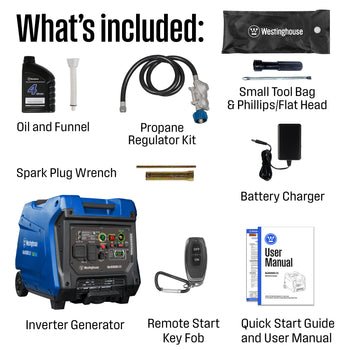
Imagine a world where you can control your home’s generator with just a tap on your smartphone, no matter where you are. Sounds like magic, right?
But it’s not—it’s the power of integrating a generator remote start with your smart home system. This seamless blend of technology not only brings unparalleled convenience but also ensures that your home is always prepared for unexpected power outages. Think about it: no more rushing home during a storm to manually start the generator.
Instead, you can focus on what truly matters, knowing that your smart home has everything under control. By the end of this article, you’ll discover how to make your life easier, more efficient, and stress-free with this innovative setup. Ready to unlock the full potential of your smart home? Let’s dive in.
Benefits Of Generator Remote Start
Generator remote startoffers great convenience and comfort. You can start your generator from inside your home. No need to go outside in bad weather. It keeps your home powered without any hassle.
It also helps save energy. The generator runs only when needed. This avoids wasting fuel and lowers your bills. Smart controls can turn it off when power returns.
Safety improveswith remote start. You avoid handling the generator during storms or at night. It reduces risks of accidents and electric shocks. Some systems include alerts for problems or low fuel.
Choosing The Right Generator
Choosing the right generator means checking its power capacity. It should match the needs of your home or devices. Too little power won’t run everything properly. Too much power can waste fuel and money.
Make sure the generator works well with remote start systems. Not all generators support remote starting. Confirm compatibility before buying. This feature lets you start the generator from a distance, which is very convenient.
Look for smart home integration features. Some generators connect to apps or smart home hubs. This allows easy control and monitoring from your phone. Integration can include alerts for fuel levels, maintenance, and running status.
| Feature | What to Check |
|---|---|
| Power Capacity | Match wattage needs; avoid under or over capacity |
| Remote Start Compatibility | Supports remote start devices; easy to activate |
| Smart Home Integration | Connects with apps; offers monitoring and alerts |
Setting Up Remote Start For Generators
Start with a compatible generatorthat supports remote start. You will need a remote start moduledesigned for your generator model. A Wi-Fi or smart home hubis essential to connect the generator to your smart home system. Basic tools like screwdrivers, wire strippers, and electrical tape will help with installation.
Follow the generator manual to locate the start/stop terminals. Connect wires from the remote start module to these terminals carefully. Secure all connections to avoid loose wires. Link the remote start module to your smart home hubvia Wi-Fi or Bluetooth. Test the connection using the smart home app to ensure it works correctly.
Common issues include weak Wi-Fi signals, wrong wire connections, or incompatible devices. Make sure the generator battery is charged. Check all wires twice for correct setup. Restart the smart home hub if the generator doesn’t respond. Consult the manual for error codes or LED signals on the remote start module.
Integrating Generator Remote Start With Smart Home Systems
Many smart home platformssupport generator remote start integration. Popular options include:
- Google Homefor easy voice control.
- Amazon Alexato start the generator hands-free.
- Apple HomeKitfor seamless iPhone and iPad access.
Using mobile apps, users can monitor and starttheir generator from anywhere. These apps offer:
- Status updateslike fuel level and run time.
- Remote start and stopcontrols.
- Alerts for maintenance and issues.
Voice assistants provide hands-free operation. Simple commands such as “Start generator” work well. This makes generator control quick and easyduring power outages.
Automating Generator Use In Smart Homes
Smart homes can automate generator useto save time and effort. You can schedule the generator to start and stopat certain times. This helps keep your home powered during specific hours without manual control.
Generators can also turn on automatically during power outages. Sensors detect the power loss and trigger the generator instantly. This keeps your lights and appliances running without delay.
Custom automation lets you set unique rulesfor your generator. For example:
- Start the generator if the temperature drops below a set point.
- Stop the generator when the battery charges fully.
- Turn on the generator before a storm based on weather alerts.
These simple setups improve comfort and safetyin your smart home.

Credit: westinghouse.com
Troubleshooting And Maintenance Tips
Check the remote’s batteryfirst. A weak battery may cause connection issues. Make sure the remote is within range of the generator. Look for any physical damageon the remote or receiver unit. Reset the remote and generator by turning them off and on again. Confirm the remote’s signalis not blocked by walls or other devices.
Keep the generator clean and free from dust. Inspect wires and connectorsfor corrosion or loose connections. Test the remote start function regularly to ensure it works well. Replace worn partsearly to avoid bigger problems. Store the remote in a safe, dry place.
| Firmware and Software Updates | Purpose |
|---|---|
| Check manufacturer’s website | Find latest firmware or app versions |
| Download updates | Fix bugs and improve performance |
| Follow update instructions carefully | Avoid errors during installation |
| Restart devices after update | Apply changes properly |
Safety Precautions And Best Practices
Safe operationof a generator remote start is key to prevent accidents. Always place the generator outdoors in a well-ventilated area. Avoid running it inside garages or near windows. Keep the remote start device away from water and extreme weather. Check fuel levels before starting. Never overload the generator with too many devices. Use a proper extension cord rated for outdoor use. Regularly inspect wires and connections for damage. Turn off the generator before refueling to avoid fire hazards.
Emergency shutdownmust be quick and easy. Know the location of the main power switch or remote stop button. In case of smoke, unusual noise, or smell, shut down the generator immediately. Disconnect all devices before turning off the power. Keep a fire extinguisher nearby for safety. Practice the shutdown steps so you can act fast during trouble.
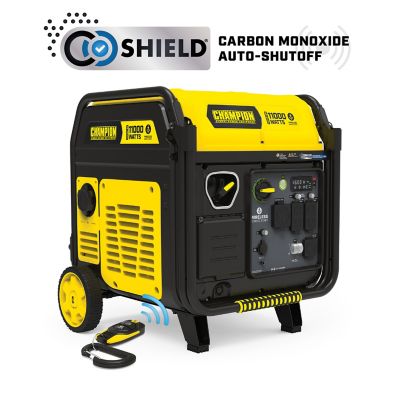
- Avoid carbon monoxide poisoningby never using the generator indoors.
- Keep children and petsaway from the generator and remote start controls.
- Do not touchthe generator with wet hands.
- Store fuelin approved containers, away from heat sources.
- Follow manufacturer instructionsfor all maintenance and operation.

Credit: intelligentcontrols.io
Credit: www.tractorsupply.com
Frequently Asked Questions
How Does Generator Remote Start Integrate With Smart Homes?
Generator remote start connects to smart home systems via Wi-Fi or smart hubs. This allows remote control and monitoring through apps or voice assistants for convenience and safety.
Can I Control My Generator Remotely Via Smartphone?
Yes, most generator remote start systems offer smartphone apps. These apps let you start, stop, and monitor your generator from anywhere with internet access.
What Are The Benefits Of Smart Home Generator Remote Start?
Smart home integration provides automatic startup during power outages. It enhances convenience, improves safety, and helps maintain continuous power without manual intervention.
Is Generator Remote Start Compatible With Voice Assistants?
Many generator remote start devices work with Alexa, Google Assistant, and others. This enables hands-free control using voice commands for ease of use.
Conclusion
Using a generator remote start with your smart home brings ease and comfort. You control power from anywhere, saving time and effort. It keeps your home safe during outages. Setup is simple, and benefits last long. Try it to enjoy smooth, reliable energy anytime you need.
Stay prepared and connected with smart technology.