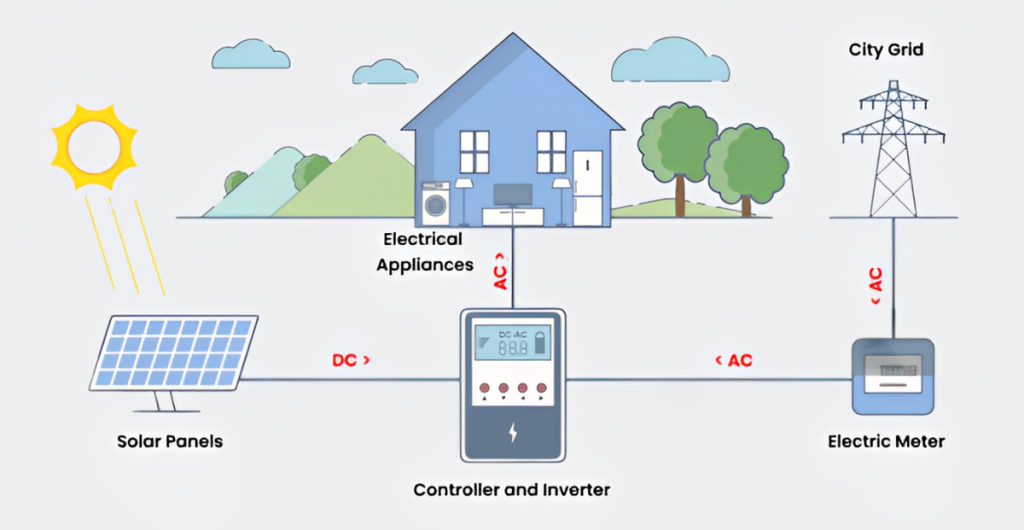
Imagine a world where your home runs smoothly, even when the power goes out. With smart plugs and a home backup system, this is not just a dream but a reality.
You might be wondering how these small devices can make such a big difference in your life. They can transform how you manage energy, providing convenience and peace of mind. In this guide, you’ll discover how to effectively use smart plugs in tandem with your backup system, ensuring that your essential devices stay powered during outages.
Stay with us, and you’ll learn how to enhance your home’s efficiency and resilience with just a few simple steps. Dive in, and let’s unlock the secrets to a smarter, more reliable home setup.
Benefits Of Smart Plugs
Smart plugshelp save energy at home. They turn off devices when not in use. You can control them with your phone. This means fewer wasted watts. Less energy used means lower bills. This helps the planet too.
Control your devices from anywhere. Turn on lights or fans with a tap. No need to get up. Set schedules for your devices. Wake up to a warm room. Or turn off the coffee maker. All with ease. This makes life simpler.
Save money with smart plugs. They help reduce energy bills. Less power used means more savings. You can see how much power each device uses. This helps plan better. Stop wasting money on unused devices. Smart plugs make it easy.
Credit: sunpura.de
Types Of Smart Plugs
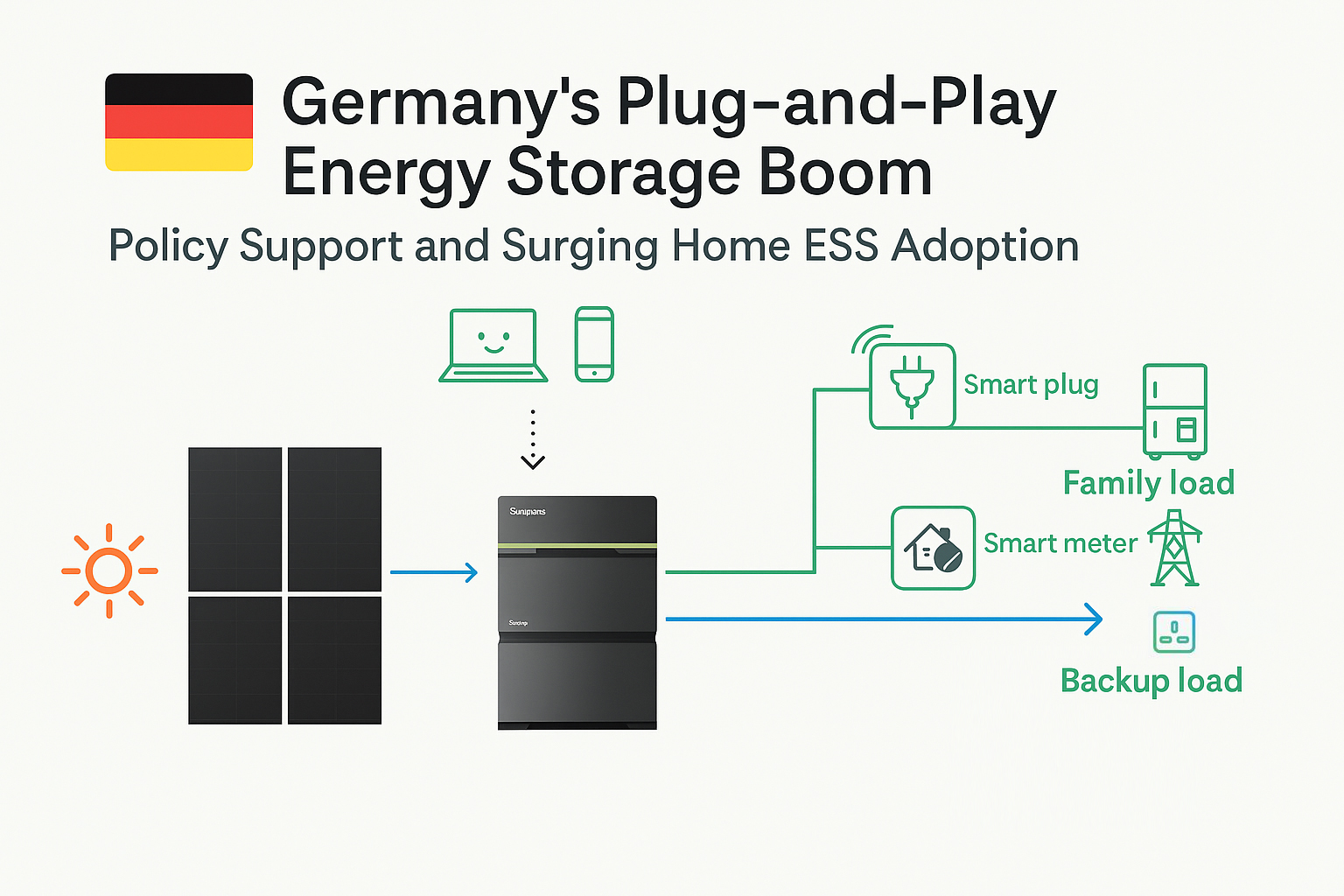
Smart plugs connect home devices to backup systems, ensuring power during outages. Different types offer varied features, such as energy monitoring and remote control, enhancing efficiency and convenience.
Wi-fi Enabled
Wi-Fi enabled smart plugs connect to your home network. They allow easy control through apps on your phone. These plugs can be controlled from anywhere with internet access. Set schedules and timers with ease. Remote access is their biggest advantage. They often work with voice assistants like Alexa or Google Home. Check compatibility before buying.
Bluetooth Enabled
Bluetooth smart plugs connect directly to your phone. No need for internet access. They offer simple and local control. Perfect for areas with weak Wi-Fi signals. Limited range but reliable connection. Ideal for controlling devices nearby. Easy to set up and use.
Zigbee And Z-wave
Zigbee and Z-Wave plugs use mesh networks. They need a hub to work. Reliable and secure connections are their key features. Great for larger homes and complex setups. They use less power than Wi-Fi plugs. Perfect for smart home enthusiasts. Ensure compatibility with your hub.
Choosing The Right Smart Plug
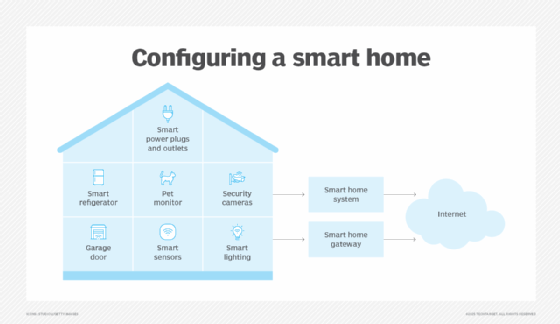
Smart plugs must work with your backup system. Check the plug’s specifications. Ensure it supports your home’s voltage and frequency. Some plugs offer an app for easy control. Verify the app works with your phone. Look for plugs that integrate with your existing smart home setup. This helps in seamless operation without technical issues.
Smart plugs have power limits. Check the plug’s power rating before purchase. It should handle the devices you plan to connect. Overloading can cause damage or malfunction. Choose a plug that matches your energy needs. This ensures safe and efficient operation. Consider future power needs as well.
Some smart plugs offer extra features. Look for energy monitoring options. This helps track usage and save energy. Scheduling features are useful for automation. Voice control adds convenience. Ensure the plug supports your preferred voice assistant. These features can enhance your home’s efficiency.
Credit: www.techtarget.com
Installation Process
Connecting smart plugs to home backup systems involves simple steps. Plug the smart device into an outlet. Then, link it to your backup system for seamless energy management.
Preparing Your Devices
Smart plugs need a strong electrical connection. Ensure all devices are ready. Check if they support smart technology. Look for a suitable place to install the plugs. Make sure the area is safe and dry.
Connecting To The Network
Smart plugs require a Wi-Fi network. Ensure your Wi-Fi is working well. Connect the smart plug to your network. Follow the instructions in the manual. Use a phone or tablet for easy setup.
Configuring Settings
Open the app linked to your smart plug. Set up your preferences and timers. Choose which devices to control. Adjust the settings for energy saving. Test the plug to ensure it works well.
Integrating With Home Backup Systems
First, check your backup system’s power. It should handle all essential devices. Avoid overloading the system. Know your backup’s maximum capacity. This helps in planning energy use. List all devices you want to connect. Check their power needs. Make sure total power use is within limits.
Choose the most important devices. Focus on things like the fridge, lights, and phone chargers. Make a list of these priority devices. This ensures they get power first. Use smart plugs to manage them easily. Smart plugs help control which devices get power. This keeps important items running during outages.
Set up smart plugs to automate power switching. They can turn on devices during an outage. Use an app to schedule this task. Smart plugs can sense power loss. They switch devices on automatically. This ensures no manual work is needed. Your essential devices stay powered up.
Troubleshooting Common Issues
Smart plugs can integrate seamlessly with home backup systems, enhancing energy management. Troubleshooting common issues involves checking connectivity and compatibility. Ensure your smart plug is correctly paired and regularly update software for optimal performance.
Connectivity Problems
Smart plugs might not connect to the Wi-Fi. Ensure the router is closeto the plug. Check if the Wi-Fi is working. Restart the router if needed. Some plugs need a specific Wi-Fi band. Make sure the plug supports your Wi-Fi type.
Device Compatibility
Not all devices work with smart plugs. Check if the device power ratingmatches the plug. Some smart plugs only work with certain appliances. Read the plug’s manual for compatibility details. If unsure, contact the plug manufacturer for help.
Power Overload
Overloading can damage the smart plug. Avoid plugging in high-power deviceslike heaters. Check the plug’s power limit before use. Use only one device per plug. Turn off the device if the plug gets too hot.
Maintenance And Upkeep
Smart plugs enhance home backup systems by managing energy use efficiently. They automatically turn off unused devices during power outages. Integration ensures essential appliances remain powered, optimizing energy distribution and extending backup duration.
Regular Software Updates
Smart plugs need updates. Updates keep devices running smoothly. Check for updates often. Install them when available. This ensures better performance. Updated software fixes bugs and improves security.
Monitoring Usage Patterns
Keep an eye on how smart plugs are used. Track energy use daily. This helps in saving energy. Adjust settings for efficiency. Identify unusual patterns quickly. This prevents potential issues.
Ensuring System Reliability
Smart plugs must work reliably. Test them regularly. Check connections for loose wires. Make sure they respond to commands. Reliable systems protect home devices. Consistent checks avoid unexpected failures.

Credit: www.jackery.com
Expert Tips For Optimal Use
Smart plugs save energy and make your home work better. Plug devices into smart plugs to monitor energy use. Set timers to turn off devices when not needed. Use smart plugs with home backup systems to keep essential devices running. Connect them to lights and heaters for automatic control. This ensures efficient energy management.
Smart plugs help improve home security. Control lights with smart plugs to create the look of someone being home. Schedule lights to turn on and off at different times. This deters unwanted visitors. Connect them to cameras and alarms for added safety. Smart plugs make your home more secure.
Smart plugs prepare your home for future needs. They easily connect to new devices and technologies. Make updates simple with smart plugs. Choose plugs compatible with your backup systems. This ensures smooth integration and operation. Smart plugs keep your home ready for the future.
Frequently Asked Questions
What Should You Not Plug Into A Smart Plug?
Avoid plugging high-power appliances into smart plugs, like microwaves or air conditioners. They can overload the smart plug. Devices with mechanical timers, like some coffee makers, may not function properly. It’s best to read the smart plug’s specifications and ensure compatibility before use.
What Are The Disadvantages Of Smart Plugs?
Smart plugs may pose security risks, require Wi-Fi, and increase electricity bills. They might not support heavy appliances. Compatibility issues with smart home ecosystems can occur. Installation may be complex for some users.
How Do You Use A Smart Plug?
Plug the smart device into an outlet, then connect it to your Wi-Fi network using its app. Control devices remotely via the app or voice assistants like Alexa or Google Assistant. Schedule power usage for efficiency and convenience. Ensure compatibility with your devices before setup.
What Is The Difference Between A Smart Outlet And A Smart Plug?
A smart outlet is integrated into the wall, replacing traditional outlets. A smart plug is an external device plugged into existing outlets. Both allow remote control, but smart plugs offer flexibility, while smart outlets provide a more permanent solution.
Conclusion
Smart plugs simplify home backup systems. They save energy and enhance convenience. Connect devices easily without expert help. Control appliances remotely through user-friendly apps. Enjoy peace of mind during power outages. Reduce electricity bills with automated scheduling. Smart plugs are affordable and easy to use.
Perfect for a safer, efficient home. Remember, technology improves everyday life. So, explore smart plug options. Choose the right one for your needs. Stay prepared and energy-efficient. Your home backup system will thank you.