Imagine a sudden power outage hits your neighborhood. Darkness envelops your home, and the comforting hum of your appliances falls silent.
In moments like these, knowing how to run only essential appliances with your home backup system can be a game-changer. Are you prepared to keep the lights on, the fridge cold, and your phone charged during an unexpected blackout? You have the power to transform a potentially stressful situation into a manageable one.
By understanding what your essential appliances are and how to prioritize them, you can ensure peace of mind and security. Dive into this guide to discover simple, effective strategies that will help you make the most of your backup system and safeguard your home when it matters most.
Understanding Home Backup Power
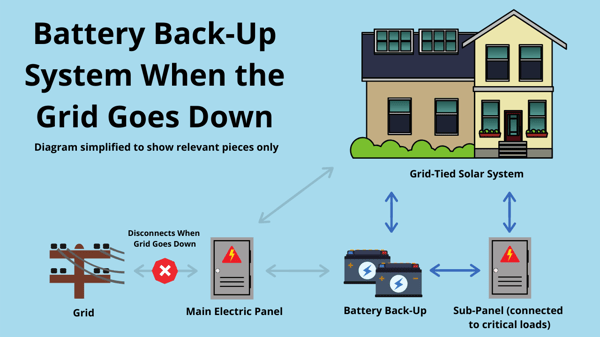
Home backup power keeps essential appliances running during outages. Choose a reliable backup source like a generator or battery. It should match your power needs. Calculate the power each appliance uses. This helps in avoiding overload.
Essential appliances include refrigerators, lights, and medical devices. These need to stay on during emergencies. Make a list of these appliances. Prioritize them based on importance. Turn off non-essential devices to save power.
Consider using energy-efficient appliances. They use less power and are better for backup situations. Learn to manage power smartly. Unplug devices when not in use. This conserves energy and prolongs backup power.
Credit: www.paradisesolarenergy.com
Identifying Essential Appliances
Identify essential appliances to keep your home running during power outages. Prioritize items like refrigerators, lights, and communication devices. This ensures safety and comfort with minimal energy use from your home backup system.
Determining Critical Needs
Choose appliances that are crucial for daily life. Refrigerators keep food fresh. Lights help see at night. Water heaters provide warm water. These are essential for comfort and health. Ask what you need to live safely and comfortably. Clean water and food storage are top priorities. Think about what you cannot live without.
Prioritizing Safety And Health
Ensure appliances help stay safe. Smoke detectors alert to danger. Security systems protect the home. Medical devices are vital if someone is sick. These appliances are important for health and safety. Check if anyone needs special equipment. Electric blankets keep warm in cold weather. Fans cool down when it’s hot. Safety and health should always come first.
Choosing The Right Backup System
Choosing the right backup system ensures only essential appliances run during outages. Prioritize devices like refrigerators, lights, and communication tools. This approach conserves energy and keeps vital functions operational.
Generators Vs. Battery Systems
Generatorsrun on fuel like gas or diesel. They can provide power for long hours. They’re good for big appliances. But they need regular maintenance. Battery systemsstore power from solar panels or the grid. They are silent and clean. They work best for small devices. Their capacity depends on the battery size.
Capacity And Power Requirements
Calculate total power needed for essential appliances. Include fridge, lights, and phone charger. Each appliance has a power rating. Add them up to get total wattage. Choose a backup system that meets this wattage. Ensure the system runs during power cuts. Check if the backup can last for several hours. Consider future needs too.

Credit: www.jackery.com
Smart Energy Management
Smart energy management helps run only essential appliances during power outages. Prioritize devices like refrigerators and lights to conserve power and ensure comfort. Efficiently manage energy usage with a home backup system to maintain essential functions without overloading.
Load Balancing Techniques
Load balancing helps manage energy at home. Use smart plugs to control appliances. They can turn devices on or off automatically. Smart devices can schedule usage times. This prevents all appliances from running at once. Balance the load by setting different times for each device. This reduces energy strain on the system.
Using Smart Plugs And Devices
Smart plugs are very helpful. Plug them into any outlet. They allow control over each appliance. Remote control is possible through apps. Smart plugs can save energy. Set them to turn off appliances when not needed. Smart devices can learn your habits. They adjust settings based on usage. This makes energy use more efficient.
Installing And Maintaining Backup Systems
Running only essential appliances during a backup can save energy and reduce costs. Prioritize vital devices like refrigerators, lights, and communication tools to ensure basic needs are met efficiently. Organize and test your backup system regularly to keep it functional and ready for emergencies.
Professional Installation Tips
Choose a reliable installerto set up your backup system. They must have experiencewith the type of system you want. Inspect wiringand connections carefully. They should be secure and safe. Ensure the installer follows all safety codes. Ask for a warrantyon their work. This ensures any issuesare fixed promptly.
Routine Maintenance Practices
Check batteriesregularly. They must be chargedand ready. Inspect for any corrosion. Ensure all parts are clean. Test the system often. It should turn onand operate smoothly. Keep all manuals handy. They help solve problems quickly. Schedule annual checkups. A professional can spot hidden issues.
Maximizing Efficiency During Outages
Energy conservationis important during power outages. Use only necessary appliances. Turn off lights and devices not in use. This saves power for essential items. Keep fridge and freezer closed to maintain temperature. This reduces the need for extra energy. Use blankets or layers of clothing to stay warm. This avoids using electric heaters.
Use a smart meter to watch energy use. It shows which appliances use the most power. Limit use of these appliances. Turn them off when not needed. Smart meters help plan energy use better. This ensures essential appliances run longer. Save battery power for important tasks. Keep an eye on usage to avoid running out of power.
Cost Considerations And Budgeting
Running essential appliances during a home backup requires smart budgeting. Prioritize devices that maintain safety, such as lights and refrigerators. Consider energy-efficient options to minimize costs and ensure reliability.
Initial Investment Vs. Long-term Savings
Initial costsmight seem high for backup systems. Batteries and generators are expensive. But, think about the long-term savings. Power outages can cost money. Food spoils in the fridge. Electronics can get damaged. Backup power keeps these safe. It reduces future costs. Initial spending pays off over time. It’s a smart way to save money.
Affordable Solutions For Every Budget
There are solutions for every budget. Small generators cost less. They can run essential appliances. Solar panels are a bit pricey. But they save on electricity bills. Portable power stations are also good. They are cheaper than big systems. They work well for short outages. Choose what’s best for your budget. Make sure it meets your needs.

Credit: www.jackery.com
Frequently Asked Questions
Can You Run A Refrigerator On A Battery Backup?
Yes, a refrigerator can run on battery backup. Choose a battery with sufficient capacity and power inverter. Ensure compatibility between the refrigerator’s wattage and the battery. Proper installation is crucial for efficient operation. Regular maintenance helps prolong battery life and functionality.
Can You Have Battery Backup Without Solar?
Yes, you can have battery backup without solar. It stores electricity from the grid for later use. This setup ensures power during outages, improving energy reliability. Consider battery capacity and cost when planning. Ensure compatibility with your existing electrical system for seamless integration.
What Is The Best Battery Backup For Small Appliances?
The Jackery Explorer 240 is a top choice for small appliances. It offers 240Wh capacity and multiple charging ports, making it ideal for camping and emergencies. Its compact size and portability add to its convenience.
How Much Is A Whole House Battery Backup System?
A whole house battery backup system typically costs between $10,000 and $20,000. Prices vary based on capacity, brand, and installation fees. Consider potential incentives or rebates for a more accurate estimate. Consult local professionals for precise quotes tailored to your specific energy needs and location.
Conclusion
Running only essential appliances saves energy during power outages. You protect your home and budget. Prioritize devices like refrigerators and medical equipment. Plan wisely for effective power use. Know your appliance needs and energy consumption. Create a list for emergencies.
This helps in quick decision-making. Efficient management ensures comfort and safety. Backup power is crucial for unexpected situations. Practice responsible energy use for long-term benefits. You keep your household running smoothly and sustainably.